Moving this topic to our Roku 1.0.1 announcement, in order to keep everything in the same place.
Hi. Hope everyone reads this. I have two TCL Roku TVs. The new Roku app will not work on either one. Since I rely on Tablo, I purchased an ONN Google Tv. Turns out, the issue may be my recordings of Blue Bloods. On the ONN, the 280 episodes reload and eventually crash the system. I’m thinking that perhaps the new Roku version ‘remembers’ the last library and tries to load it. At first upgrade on Monday, I was able to watch with the new Roku version, did not like the absence of preview boxes, but at night, we watch Blue Bloods reruns, which is when the problem started.
The iPhone app is stable. in all this, but the ONN app will ‘hard crash’ when doing too much scrolling through Blue Bloods, requiring a tablo button reset. If a release is not done soon, I’m going to have to wipe out some and trust ION will replay it. ONN appears to be constantly trying to refresh the screen on scroll. I am able to watch other programs with it.
My observations are in my post.
I just received the firmware update.  when I fast forward I can’t see a preview of the timeline like before. Is there a setting to turn it back on? I am having a hard time pinpointing where I want to stop during fast forward or rewind.
1 Like
Where is the Roku 1.0.1 announcement?
We’re already here. You should see it at the top of this post.
Top of the post still shows v 1.0.0. The Update on April 9th says issues with v. 1.0.0. Nowhere does it show v 1.0.1.
So is the forthcoming updated going to be 1.0.1?
1 Like
I did check out the blue button method last night. Holding down the blue button does not have an “auto-repeat” function. You have to do a button press for each advancement.
The blue button approach isn’t as good as the previous FF/RW functionality, but it is a little better than the current FF/RW functionality.
I will use the blue button method while I wait for the real fix… if they ever decide to do it.
Thanks for pointing out the blue button method.
i agree it is confusing. all i want are the recorded shows and date to goto the oldest first. I am missing shows i recorded also. i did notice when i finished and then tried to delete it hit button to go back to it and not there, had to go all the way back out scroll find again, select it then select delete. wierd. The info at botton of each show with now 0 recording and then 2 upcoming is a waste and to small to read even on a 55 in roku tv. Just need category for recorded shows with oldest in one stop either top or bottom so know where to go to start watching oldest first.
I have the same problem with skipping forward/back… sometimes just hangs up.
I have a Roku Streambar running 14.5. The Tablo TV app hangs at launch stating “Connecting to your Tablo”. It never gets past this state despite working perfectly on my Android phone. Any help is appreciated.
1 Like
Same problem on all of my Roku devices. Just stuck “connecting”. Phones connect fine with iOS devices.
1 Like
My Roku Soundbar (which is now called the stream bar pro) running 14.1.4 still, is the only one of my 4 Roku devices that connects. It was the first one I tried when the 1.0.0 came out. I don’t know if that has something to do with it but…. 
I agree, I would gladly give up all the new bells and whistles to get back the old Fast Forward. It was better than any of the fast forward feature available on other services.
4 Likes
I don’t like the new fast forward either. The old fast forward was the best feature of Tablo.
2 Likes
Apologies,
We’re working hard on the hotfix and hope to have it available soon.
4 Likes
I just found another glitch in the new version.
Tablo ver. 1.0.0-734366
ROKU ver. 14.5.4
ROKU Ultra 4670X
Closed caption will not turn on. Closed caption works when streaming from other apps, but not when viewing live TV through The Tablo box. Is there some setting I can make here or is it a glitch in the software or???
1 Like
A NEW Roku CC issue ! Just showed up with Tablo’s 2.2.54 update 4/2025
I’m seeing this on the Roku ultra 4800X ( and another model Roku box). Both Roku’s have the latest Roku apps & FW.
If you enable CC ( closed captions) in the Tablo app , the status shows ‘on’ but playback does not have any closed captions even starting or re-starting the live or recorded programs ! ( this feature was just added in this FW update)
BUT -
If you start CC in the Roku. Verify its working on any video stream , then start up the Tablo app, CC works correctly !
YES using this alternate process , CC will work but Tablo has some problems with the Tablo application/ FW update when they tried to add CC enabling In the Tablo menu’s ! [ for Roku]
**** android app correctly impliments CC ****
Hank
1 Like
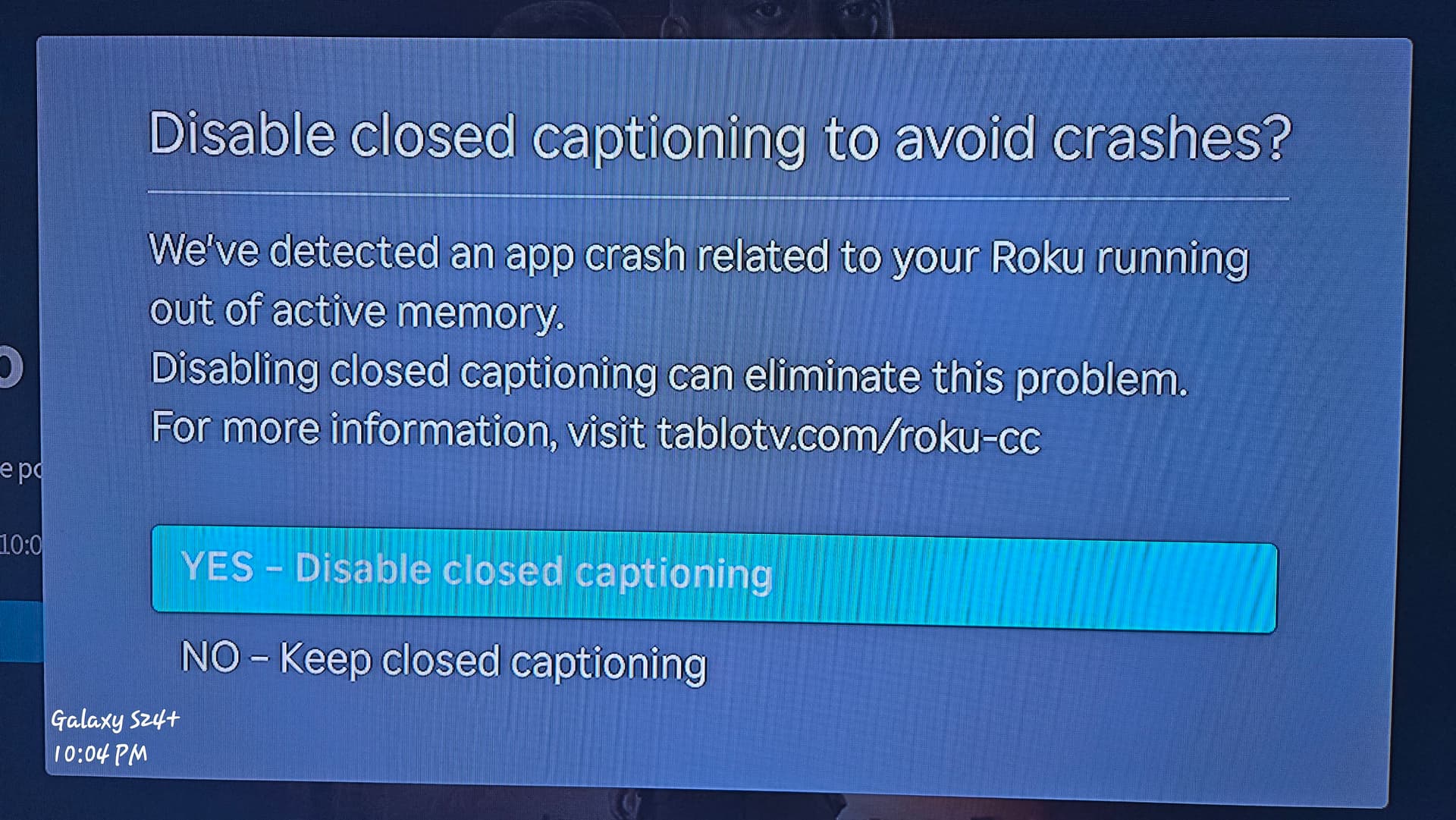
On latest Roku Ultra 4850X with updated Tablo Roku app 1.0, I see this if I have “CC on Replay” enabled. We’d never seen this before the update. Tablo popup:
1 Like
Interesting… I have ‘CC on Replay’ selected on mine. I am not having any troubles with it since the update.