hmmm… and you said you’re using mint? let me put it in a VM and see if i can reproduce
That is right, I am using
Linux Mint 22.3 - Cinnamon 64-bit
Good news, I was able to reproduce and figured out the issue. The ffmpeg binary (v7.0.2) I bundle in the appimage crashes on LM 22.3, not really sure why – it doesn’t do that on Arch or Fedora, which are the distros I test on.
The reason 2.0.1 works is I had actually broke the path to the bundled ffmpeg binary in THAT version, and it was falling back to use the system-installed older ffmpeg (6.1.1) that you have installed from the current LM repo. (This also aligns with @KGBnut 's comment that 2.0.1 was working ‘once i installed ffmpeg’…you shouldn’t have to since it’s bundled, but I messed that up in the Linux version.)
In the next version I’ll have it prefer the OS/system ffmpeg if available instead of using the bundled binary.
For now, you can just keep using 2.0.1, the only difference (besides ffmpeg issue) are the command-line options and being able to delete recordings from within the app.
3 Likes
Another Linux Mint Mystery Solved!
Thanks for the work senke7su.
I just joined this community mostly to thank you for making this awesome app! I had only been testing my new 4th generation Tablo for about 2 days and was annoyed that it didn’t have out of the box support for viewing on a desktop/laptop; and that I couldn’t copy recordings to either of those in a useable format. I was considering returning the Tablo and rolling my on PVR set-up, but being lazy I wondered if someone had already come-up with any workarounds. Searched and found your app which solves both of those problems neatly and efficiently. Again, thanks so much for your hard work!
4 Likes
Exceptional job! Works great on Linux Mint.
Thank you!
Set up a funding site so we can send you a couple of bucks for all your hard work.
I would also suggest marketing this to Nuvyyo … It provides some nice additional features which can be included in their advertising.
This is their forum…I also post on reddit where they have an active account. They know where to find me 
2 Likes
Using the AppImage version 2.1.1 on Manjaro Linux with VLC 3.0.22 and getting playback error. Downloading works great for both raw or transcoded files, but can’t play anything. VLC launches, but nothing plays.
cause: Error: connect ECONNREFUSED 127.0.0.1:8080
at TCPConnectWrap.afterConnect [as oncomplete] (node:net:1637:16) {
errno: -111,
code: ‘ECONNREFUSED’,
syscall: ‘connect’,
address: ‘127.0.0.1’,
port: 8080
}
I had the same issue on a laptop but it worked on my desktop. It was my stupidity…I installed VLC on the laptop(it was already on the desktop) and it now works great.
VLC is installed, and the VLC window opens, but it doesn’t play anything. The text in the VLC window title bar keeps flickering, like it trying to do something, but nothing plays in the VLC window.
You sure you got the right VLC? There are some fakes out there that try to make you think it is the original.
Movavi.com is one of them
Be sure you get it from videolan.org!
EDIT: I see you are on Linux. Sorry, I was thinking it was Windows.
Hey @MT58
Was able to reproduce this. VLC from Manjaro’s default repos is old, 3.0.23 has been out for over a year and is in the upstream arch AUR, not sure why it’s not using it.
Anyway, first try this, Manjaro doesn’t include proprietary (‘non-free’) codecs by default:
sudo pacman -Sy vlc-plugins-all
If that doesn’t work, uninstall VLC from Manjaro’s add/remove programs. After that, install VLC from flatpak:
sudo flatpak install flathub org.videolan.VLC
After this, Tablo Player worked right away in Manjaro in my testing.
Thank you @senke7su ! Installing the plug-ins fixed it.
Love the tablo player Thanks for that. Is there a way to get the other channels that aren’t OTA but the ones included with Tablo?
This program is awesome, i can finally view TabloTV in Linux. However I am deaf and i cant figure out how to turn on the close captions on your program? Other than that works amazing! Thank you!
Did you google
how to permanently turn on closed captions in vlc
And try:
To permanently enable closed captions and subtitles by default in VLC, access the preferences menu. Go to Tools > Preferences > Subtitles/OSD. Ensure Enable subtitles is checked and set the Preferred subtitle language to your language of choice (e.g., “en” or “English”)
1 Like
Yes I already tried that, still no closed captions.
Hi @thorpe1968 ! Glad you’re enjoying it – I got CC’s working, manually choose the subtitle track in VLC:
(this is on mac, might be in a different place on linux)
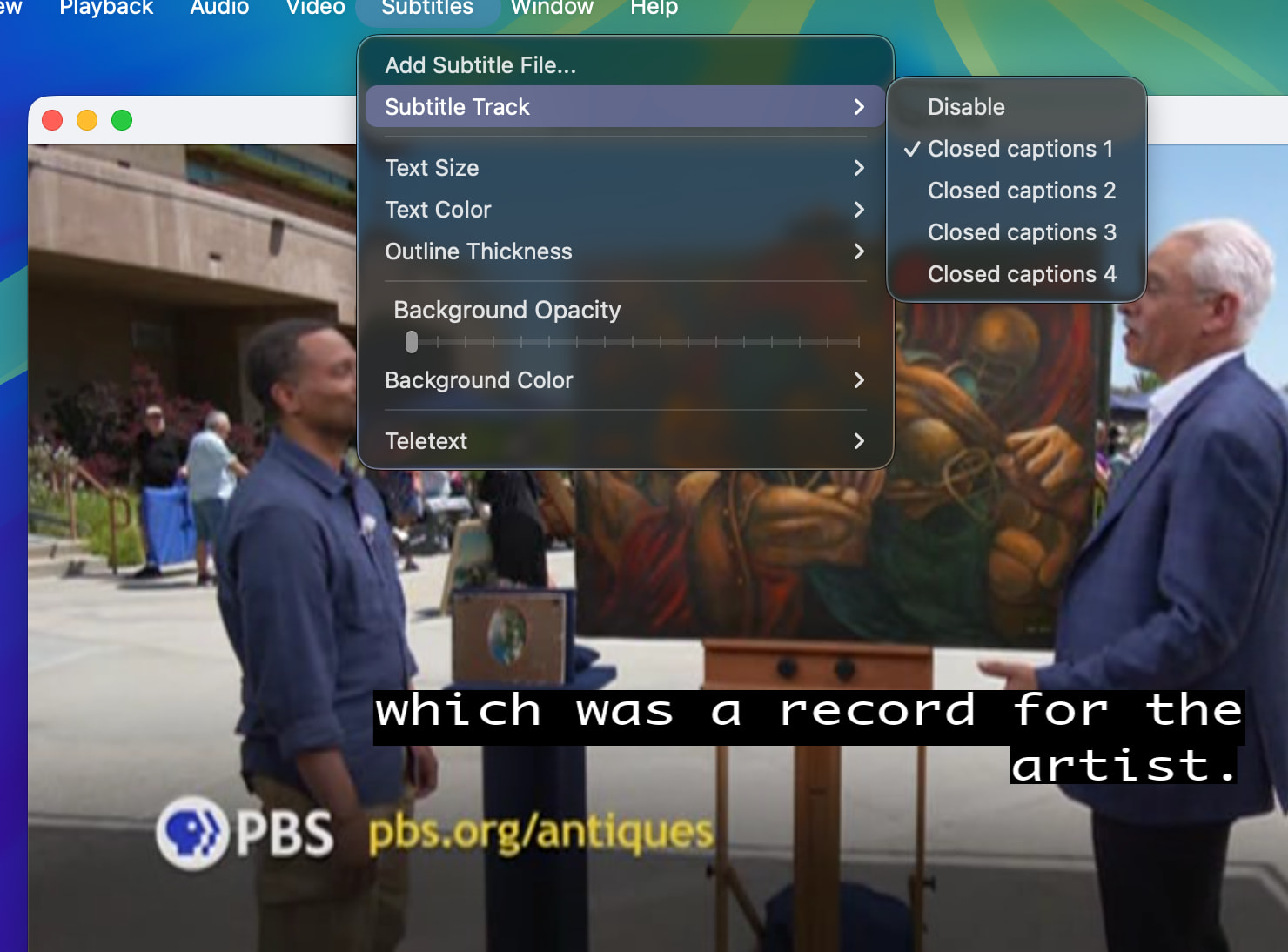
Note, it does take a bit for them to load! I had to wait like 20-30 seconds after choosing CC1 before they showed up.
Thank you so much, that got it working, i really appreciate and thanks for your great program!
Yay CLosed Captioning 
Ray…