As a couple of you saw in the other thread, I wrote an app for watching your 4th gen Tablo on your PC, Mac (Apple Silicon only), or Linux desktop. I just released version 2.0.1, you can download it here.
Key Features:
Supports gen4 devices only – EDIT: multiple users have confirm the app now works on legacy devices with the new firmware.
Watch OTA channels live (64-bit VLC install required)
Download recorded content with transcode and queueing support
Since I worked for a large networking vendor, I know there is a future timelines and deadlines to meet. However, They need to consider pulling this in or at least keep it on their radar.
For Linux, just download the AppImage version, make the file executable, and run this command from its download folder. I removed the space in the filename before running. Very easy to do with no installation. You may have to add the –no-sandbox flag. Works great.
Make the file executable by clicking on the File Properties and checking the “Is Executable” or “Allow executing file as program” check box.
Run ./TabloPlayer-2.0.1.AppImage --no-sandbox
NOTE: use your .AppImage file name in place of what I used and remember to escape any space that you keep; also, test without the –no-sandboxflag and remove it if it’s not needed.
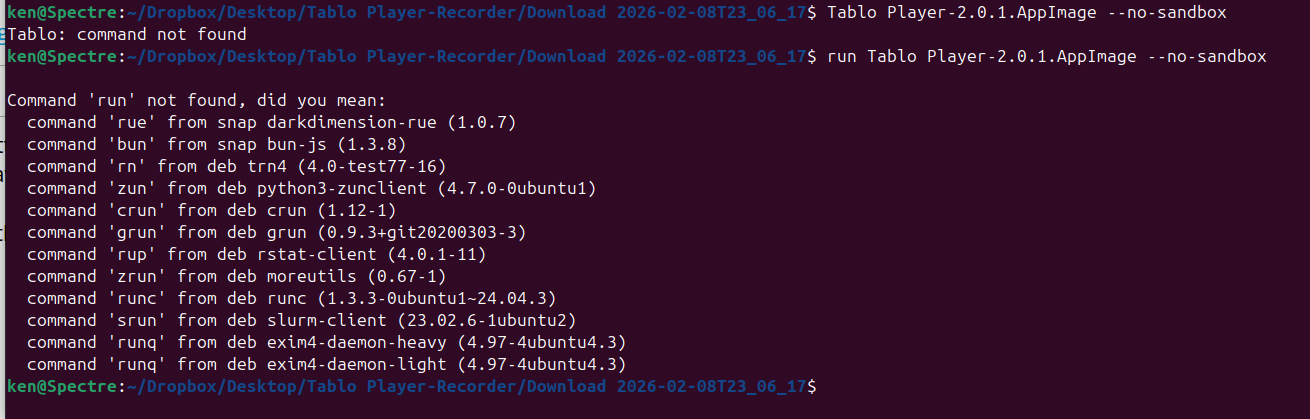
I could use a little additional help installing on Linux. I’ve been using Ubuntu for years, but I don’t think I have ever done an install from an AppImage.
I navigated to the folder, and then tried to run the command. I must be doing something wrong.
couple things, my app doesn’t ‘install’ on linux - it’s self-contained and just runs out of the app image (similar to PortableApps on Windows).
second you need to make the AppImage file executable, and escape the space with \ :
chmod a+x Tablo\ Player-2.0.1.AppImage
then you should be able to run it (again, escaping the space with \ ):
./Tablo\ Player-2.0.1.AppImage
you should also just be able to double-click the file in your file explorer at this point. you shouldn’t need the --no-sandbox switch (i’ve never needed it on my Fedora or Arch systems) but distros can be different so feel free to try it if you run into issues
Thanks for the help. I still have to monkey with it. I haven’t downloaded 2.0.1 yet. Still have 1.5.0, but I am getting another error regardless. I’ll keep trying.
My assumption is that an .AppImage file in Linux is like an .IMG file in Windows - it’s a container for a file structure that can be mounted just like a hard drive.
You can use the –no-sandbox flag to run it without its sandbox, which is less secure for untrusted software - I had to do this on Kubuntu. You could also use the –appimage-mount flag and just mount the file as a drive to inspect the contents. I don’t know if you can run the app this way though.
I think the problem with my post is that I said I renamed my file to remove the space, then gave you a command with a space. I’ve updated the post to reflect the file information. It appears that @senke7su solved that for you with the escape character.
The next issue is unknown to me. I would try what @senke7su recommended - just remove the –no-sandbox switch and retry.
I did a quick search online and found that you can 1. install the older libfuse2, 2. extract the AppImage and run the main executable inside the squashfs-root folder, or 3. ask the developer to update to the libfuse3 library.
I’ve been using Ubuntu since 18.04 Bionic Beaver, so that is about eight years. I really don’t use Windows at all anymore. I don’t consider myself a power user. I can make my way around the terminal, but I mostly use the GUI. I take these opportunities as a challenge to learn more about it.
Thanks for the help. I will get it figured out… but may bug you folks a bit more in the process.
BTW, I have gotten Tablo to run on my Linux laptop using Waydroid. In fact, it runs quite well.
Not working for me. I have it installed on a Win11 PC. When I run the program the tablo-player opens in a blank white screen. Any ideas what the problem might be?
[Caveat: make sure you first install the VLC package. The program requires it.]
On Ubuntu Linux, I got the same error message you did. I took their advice and ran:
./Tablo_Player-2.0.1.AppImage --appimage-extract
This created a subdirectory called squashfs-root and extracted a bunch of files there. In my terminal, I changed to that directory and ran this command:
./tablo-player --no-sandbox
And it ran!
I tested playing live TV, and I downloaded a previously recorded program to MP4, with no problems. It’s quite a nice program. Huge thanks to the author!