Yes, I mentioned in a previous post that the dev might be able to update the code to FUSE3, although there may be a reason they don’t or otherwise can’t. No worries, your workaround should work. This app sure works well.
You might need to be careful about that.
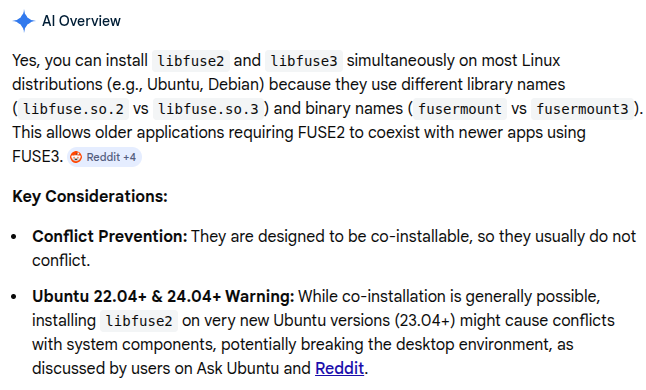
Here’s the referenced reddit thread:
https://www.reddit.com/r/Ubuntu/comments/198iudd/fuse_package_proplem/
Wow this is amazing and what I needed. I just installed it, make sure you mention VLC a lot more as that was my problem. I only saw about it later  was about to uninstall this as thought did not work. Now with VLC installed works great so far.
Installed on Windows 11 and works fine, have not tried on Linux yet, thats for later on.
1 Like
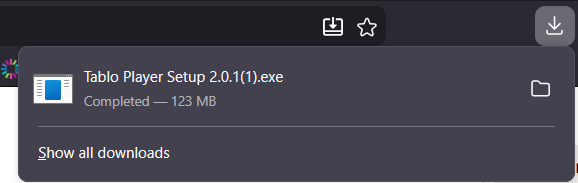
Did not work for me when I tried to download I get this file: Unconfirmed 911391.crdownload and not an executable for WINdows.
Either the download didn’t complete or you didn’t wait long enough after it completed to run it. Check your downloads folder for the actual .exe file. If it’s not there, try downloading again.
Okay I will try again but I did try 3 times before I gave up and each time is said it downloaded 100%.
I tried again and same results.
It says it is downloading :Tablo Player Setup 2.0.1.exe but when I go to the download folder what has been downloaded is this file: Unconfirmed 647454.crdownload
So all of you folks had no issue?
I just tried it and it downloaded fine for me.
No, I didn’t have an issue. I’ll try again… Yes, it’s working for me. For some reason the file isn’t completing and not saving to your hard drive. Do you have a Proton Mail account? If so, you may need to be logged into Proton.
You might also try opening a new InPrivate window in Edge or a new Private window in Firefox and trying from there.
Also, make sure you have VLC v3.0.22 or higher installed.
NOTE: I have to update the first sentence. I DID have an issue a few weeks ago when I originally downloaded the file - I had to log into my Proton Mail account to complete the download.
Here’s the link so you can copy/paste it into the new InPrivate window.
I do not have a proton account. Is that required? Also I don’t know what a private window is in Edge or Firefox. If you tell me how to get one or what a private window actually is I would try that.
I just tried again with same results.
VLC is v3.0.23.
And thanks for all the suggestions. So far still trying to figure this out.
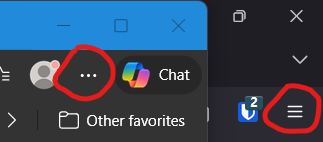
To open an InPrivate winodw in Edge click the circled 3 dots or, for Firefox, click the 3 lines tool item in the image below, then click the InPrivate or Private menu item. You can then copy and paste the link into that new window and try the download again. Don’t know if it’s going to work, but it’s worth a try.
Also, do you update or restart your computer often?
Tried the InPrivate Window and same results.
Yes I update and restart daily.
Chrome did not finish the download. Try Firefox.
Actually I used Edge.
Edge is Chromium based.
I was able to download it on my Chromboook using Chrome. Now I have to get it over to my Windows desktop.
Will let you know when I get that done.
You might also run be able to run the .AppImage version on your Chromebook. Check Google for instructions how to do this if you’re interested.
Actually, I have the Tablo app running just fine on my Chromebook so need to do this.
Guys and Gals I moved the Tablo.exe file I downloaded on the Chromebook and it installed on my Win11 desktop just fine and works.
Not sure what the download issue was so if anyone else runs into it I don’t know what the solution is.