I wish Tablo had this built in.
2 Likes
I have to admit - @joedv has come up with some pretty desirable features that we’re going to have to try out. And I’m shocked that Tablo isn’t doing the same. In their defense, they have at least 9 different apps to maintain and a Windows and browser app would make it 10 and 11.
Can the channels be exposed as IPTV streams so they can be used in a media server like Plex or Channels? This would help push me to create such a home media server.
2 Likes
Yes, that’s doable. TabloView already has the channel lineup, the two-week guide, and live streaming from the Tablo, so it can publish them as an M3U playlist with an XMLTV guide for Channels DVR, Jellyfin or Emby. For Plex, it can appear on your network as an HDHomeRun tuner. Each stream uses a Tablo tuner like any live viewing, and TabloView needs to be running on an always-on PC. I’ll look at adding it in an upcoming version. Which media server would you use? I’d like someone to help test.
And, what I’m working on at the moment:
Coming in TabloView 1.1.6
Done:
- Much faster first load. A new computer loads everything from the Tablo in under a minute instead of 5–10, with a progress banner while it runs, and no more “Tablo isn’t responding” during loading.
- Steadier playback on Intel graphics. The graphics chip’s video converter no longer drops out every so often, and if playback ever stops early it picks up again on its own.
- Preview frames when you hover over a recording’s timeline.
- Sleep timer in the player: 15–90 minutes, or at the end of the show.
- “On now” on Home: what’s airing on your favorite channels, one click to watch.
- Smaller MP4 exports (about a third smaller), and export several episodes at once.
In progress:
- Re-record failed recordings: when a recording fails or comes out short, TabloView finds a rerun of that episode and records it.
- Commercial skip for the shows you choose. TabloView analyzes recordings in the background on your PC and lets you skip the breaks.
- Choice of audio track, such as Spanish or described video when the broadcast has it.
- Closed captions in the player.
1 Like
Two issues off the bat - I’m not quite sure which media server we’ll use and I’ll have to find an always-on computer running Windows. I have several Linux and RaspPi always-on devices that could be helpful to use for such a purpose. Does TabloView run on these OS’s?
At the moment, no. Like I said, this was for me originally and just a simple windows pc. If you’re doing Plex, there’s another app that someone else wrote that does the HDHomeRun emulation at GitHub - hearhellacopters/tablo2plex: Tablo 4th Gen proxy to Plex server translation · GitHub Pretty sure that might run on Linux, so might want to give that a look.
1 Like
I think it is amazing that you have put this together. Sadly, I am one the does not use Windows. I switched completely to Linux (Ubuntu) a few years ago and haven’t looked back. If I have some time, I will experiment to see if it will run under WINE.
TabloView for Linux (test version)
Several people asked for Linux, so here’s a first version for Linux desktops. There’s no package yet: it runs from its source code with a start script that sets everything up for you. It works like the Windows app, in your browser at http://localhost:7070.
What you need: a Tablo 4th Gen on your home network, your Tablo account, FFmpeg, and Python 3.12 or newer (older systems can use the free uv tool instead; the instructions explain).
Setup
- Download TabloView-1.1.6-linux.tar.gz from Microsoft OneDrive and unpack it, for example in your home folder.
- Install FFmpeg:
- Ubuntu / Mint / Pop!_OS:
sudo apt install ffmpeg python3-venv - Fedora: FFmpeg from RPM Fusion (Fedora’s own
ffmpeg-freecan’t convert the video) - Arch:
sudo pacman -S ffmpeg python
- Ubuntu / Mint / Pop!_OS:
- In the TabloView folder, run
bash start-linux.sh --install. The first run takes a minute, adds TabloView to your applications menu, and opens it in your browser.
Full instructions, including older systems like Ubuntu 22.04, Debian 12 and Mint 21, are in LINUX.md inside the download.
What works: everything in the app: recordings, guide, live TV with pause and rewind, series scheduling, captions, commercial skip, MP4 export and the rest.
Not yet on Linux: the tray icon, starting automatically, desktop notifications and update notices. Check this thread for new versions.
This is a test: I haven’t been able to try it. If you give it a go, please reply with your distribution and version, and how it went. If something fails, paste the text from the terminal window.
3 Likes
Hello, Working on testing on my Mac mini. Started Brew install, do I need to running the next steps (next to smiley face below) as mentioned in terminal? I have not yet installed Python or ffmpeg.
=> Pouring portable-ruby-4.0.7_1.arm64_big_sur.bottle.tar.gz
==> Installation successful!
==> Homebrew has enabled anonymous aggregate formulae and cask analytics.
Read the analytics documentation (and how to opt-out) here:
No analytics data has been sent yet (nor will any be during this install run).
==> Homebrew is run entirely by unpaid volunteers. Please consider donating:
==>  Next steps:
- Run these commands in your terminal to add Homebrew to your PATH:
echo >> /Users/chaz/.zprofile

echo 'eval "$(/opt/homebrew/bin/brew shellenv zsh)"' >> /Users/chaz/.zprofile

eval "$(/opt/homebrew/bin/brew shellenv zsh)"
- Run brew help to get started
@Chazbury again, I’m not a mac person nor do I have one, but I would say yes, I would do those steps to put it in your path
TabloView 1.1.6 is out
This one has some of the most-asked-for features, including one Tablo took away.
Commercial skip is back, for the shows you choose
On a show’s page, turn on Skip commercials. TabloView finds the breaks in the background on your PC, at no cost to your Tablo’s tuners, and marks them on the timeline. When you reach one, press Skip break (or S), or have them skipped automatically (Device → Playback). To do just one recording, use the episode’s ⋯ menu → Find commercials.
It’s tuned to skip too little rather than too much: it would rather leave a few seconds of ad than cut into the show. Shows with a consistent look work best; very colorful shows like The Price Is Right may have a break or two left unmarked. Nothing is ever deleted, so you can always rewind into a break.
Also new
- Closed captions in the player: the CC button, or press T.
- Preview frames when you hover over a recording’s timeline, across the whole show.
- Sleep timer: stop after 15–90 minutes, or at the end of the show.
- On now on the Home page: what’s airing on your favorite channels, one click to watch.
- Failed recordings are recorded again when the guide has a rerun of the same episode.
- Smaller MP4 exports (about a third smaller), and export several episodes at once.
- Much faster loading from your Tablo. A new computer is ready in under a minute instead of 5–10, with no more “Tablo isn’t responding” while loading.
- Steadier playback on PCs with Intel graphics.
- A PIN for other devices. If you use TabloView from a phone or another computer (on the same network), set a PIN under Device → Network access. Other devices sign in with it once; the PC itself never asks. If you had network access on before, other devices will wait until a PIN is set.
How to get it
- Microsoft Store: TabloView for TabloTV - Free download and install on Windows | Microsoft Store It updates on its own, or open the Store → Library → Get updates. The app doesn’t show up in Store search, so use this link.
- Windows installer: Microsoft OneDrive (TabloView-Setup-1.1.6.exe). If you already use the installer version, TabloView will show “Update available”.
- Linux (new, test version): same folder, TabloView-1.1.6-linux.tar.gz. Setup instructions are in LINUX.md inside the download; see the Linux thread for details.
As always, feedback and bug reports are welcome here.
I don’t use Windows anymore but this sounds like a great application. I use tablo2plex in a docker container on my NAS to get my Gen4 Tablo running through my plex server and it works well also. Maybe I’ll find some time and try it on my Mac in the future.
Excited to try this if it ever becomes available for those of us with legacy devices.
Wow, I downloaded this from the MS store and tried it out. It’s quite powerful and enabling for Windows users. Very nicely done, @joedv.
There’s so much functionality that I think if I had to navigate around with a Roku or FireTV remote it’d be challenging.  Each screen has a surprising amount of working functionality.
1 Like
I just tried it out and it works with my OG Legacy. It asked me at the very beginning which Tablo to load.
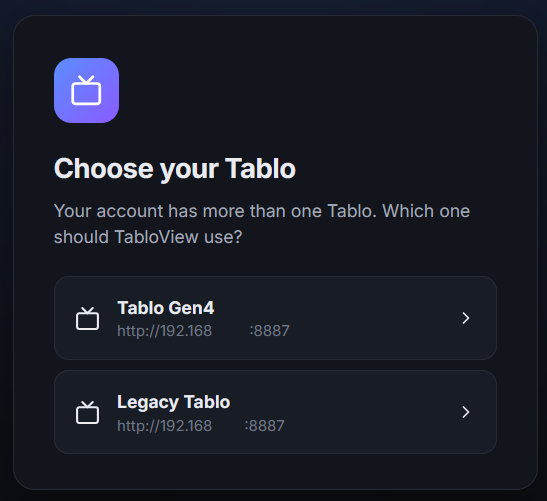
Just installed and appears to be working for me as well. Maybe a legacy unit with the latest firmware that enabled the 4th gen app support is why it’s working?
2 Likes
Well that’s good to know it works with the original. My original is in a box somewhere, so can’t test it, but the official stance is that it’s not supported but if it works, even better.  If after using it you come up with issues or a wish list, just let me know.
1 Like
I just downloaded the app from MS.
The software asked me which of my Gen4 Tablos to connect. I selected 4 tuner, the one wired to my network. It shows on top left of screen.
The message at the top of the screen says:
“Your Tablo isn’t responding right now.”
I’ve tried sync a couple times. I get a row of broadcast channel listing’s but no picture/sound.
Next step suggestions?
Do I need to be signed in to MS One Drive?
No, I should put a note that it takes a while for it to sync the first time. I would let it do it’s thing and if it’s still blank after 10 minutes, go to Device and at the bottom there’s a diagnostic where you can run an api inspector. Do that and send me what it says if you could.
1 Like
Yes, I had to wait 10 or so minutes the first time I loaded each device and their respective guides, recordings, and channel lineups.
This is such a bizarre, weird coincidence. I wish I would have found this post sooner to save time.
I couldn’t sleep so I used Claude and vibe coded a Linux version completely written in python at 3am. This was mainly so I can watch view live OTA content on my linux laptop (Ubuntu 26 and PopOS! Cosmic) or from mostly anywhere over a VPN like tailscale. I just published to github because sharing is caring and it worked for me.
Oh … and there’s one more thing- it should now work on a variety of other devices, OS platforms like Windows 11 and macOS (but untested), and various other use-cases. It doesn’t have some great features you’ve made but it’s quick easy python code, easily auditable, and should work on the most popular OS platforms using command-line only menus or through its web server capabilities.
1 Like