2.2.2 has a lot of bugs that 2.2.6 has fixed. But yes your decision.
But I’m not having any of those 2.2.2 bugs. I don’t have orphaned recordings. And the guide update that deletes “record once” has been going on since before 2.1.28 firmware.
And since 2.2.6 isn’t a major update and only a simple maintenance release to bugs introduced in 2.2.2 there really should not be any regressions in 2.2.6.
I wish I hadn’t updated to 2.2.6. It 2-3 minutes to access my recordings on the main Roku Tablo channel (not preview channel). Next time, I’ll take your advice Zippy and wait on a firmware upgrade. Last time I upgraded, my manually scheduled recordings wouldn’t record… and in order to fix that problem, I had to go and rename all of them in order for the Tablo to begin recording them again.
My harddrive has gone missing from my Tablo…
I’ve done multiple re-boots, but Tablo still won’t see the harddrive. I’ve been traveling for a couple of weeks, and it looks like I lost the harddrive connection to the Tablo on October 8th (last show that was successfully recorded), but I can’t play back anything and have the No Hard Drive message in my settings menu (running latest 2.2.6 release).
I’m thinking my Tablo is bad, as it is one I received as an RMA, and ever since, have had issues with the harddrive (two different ones - including one that worked perfectly on my original Tablo of almost a year).
Short of reformatting my harddrive (yet again) - any suggestions on how to get it to connect again to the Tablo?
Did you switch usb ports?
Yup, multiple times. Tested that the USB ports have power as well…
There is a lip-sync issue with Google Chrome … I don’t have perfect reception and every time there is a ‘blip’ in the signal, the sync between the sound and lips grows further and further apart. Restarting syncs it back up, but it soon becomes unwatchable. Should have stayed on 2.2.2.
Which hard drive are you using? I was using a WD Elements 1 TB but upgraded to the same 5 TB that they tested in house. No problems. I even got the exact model even though Amazon said a newer version of this disk is available. What did they change in the newer version? The one I got was tested, so I went with tested instead of newest.
1 Like
I thought so too, but my 2.2.5 upgraded to 2.2.6 because there was a couple of fixes that did not make it to beta. I got it this morning.
I am a brand new Tablo user, as of yesterday. I don’t know if it is due to the 2.2.6 upgrade it loaded, or if this is just how buggy this device is, but I am now stuck with a device for which I cannot connect to from any of my devices
It seems that a new connection, from a new external device, might work for a while but if that external device gets disconnected for any reason I am getting the horrid “There was a problem establishing an authenticated session with your Tablo. This could be due to either authentication or internet connectivity issues.”
I now have an Amazon Fire TV Stick, my Android phone, and the web app on my Windows box using either Chrome or Firefox all with this problem.
Additionally, last night I noticed the channel list was not populating and was stuck at 0 channels (0/0), only after I removed my hard drive did it actually complete the channel scan.
Then as I have seen reported in this discussion, the guide would never update. In that very rare occasion that one of my devices was able to connect there was nothing loaded in the guide and I could only watch live TV by selecting the specific channel.
Do I have a flat out lemon??
Thanks,
Scott
UPDATE: For some reason now this morning my devices are all able to connect again. I’m still afraid to do anything to disconnect them for fear I’ll get back into that vicious authentication problem again, which really stinks when I want to change my Fire Stick to maybe SlingTV or Netflix.
I still cannot get the guide to update. When I go to Live TV I only see the channels, and then I can’t see them all and only maybe the first 8-9 channels, with no way to scroll down to see the other channels.
My Tablo updated to 2.2.6 yesterday (from 2.2.2 which was running just fine). I also got the update on the Roku preview channel and I made sure I’m using the latest web app in Chrome.
So far it’s running fine (feels a tad slower). However, I have noticed that the Guide is either not updated anymore automatically or the reporting is wrong. It always stays at “updated 3 days ago”.
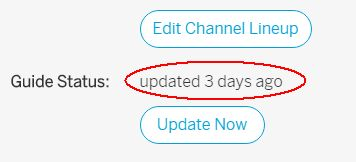
I already forced a manual update via “Update Now” which it did. At least I saw the progress message. After that the Guide status still stayed at “updated 3 days ago”. Is this a know issue?
1 Like
Upgraded to 2.2.6. My Roku 3 no longer recognizes my Tablo. The Android Tablo app can’t see any of the programs recorded via 2.2.2 or earlier. The Chrome browser can see the recorded programs but also sees programs that were deleted when 2.2.2 was loaded and cannot be deleted via 2.2.6. Anyone else have similar results?
It’s an older WD Scorpio Blue 160 GB
I am having that issue as well, and noticed several times that although Tablo was trying to download guide data, it was stuck at 0% and it seemed the only way to stop it from trying to update the guide was to reset the unit. Unless I did that, I couldn’t sync the Chrome web browser to Tablo.
Now, I did notice that when I edited my channel lineup just prior to 2.2.6, that Tablo didn’t re-download the guide data, automatically, and I thought maybe that was a new feature if you edit the channel lineup without doing a new channel scan. Thinking back this morning that may have had something to do with it, I went in and edited my channel lineup again, and the guide data immediately started downloading. I’m hoping that will fix my issue for me. and that the guide will download automatically overnight.
Of course, it’s possible there is a bug somewhere, either in the server responsible for providing guide updates, or the server is overloaded, misses an update to some units and Tablo gets stuck waiting for it, or perhaps a bug in the Tablo firmware, as I have seen several posts like this.
Works great. I can’t believe how fast the preview is when fast forwarding a recrding on my phone.
Updated with no problems and seems to address a number of my performance gripes with the Roku. I did notice it seemed to hang at 0% for a while but suddenly jumped to 80% and continued. Those of you that encountered this problem, I’m not sure how long you waited before rebooting but I almost reached that point.
What speed can a roku 3 handle? My Tablo is hard wired to my router, and roku 3 is hard wired all on a gigabit network. My understanding is the limitation is the hardware of the roku 3. Can roku 3 handle the 10mbps or should I set it at something lower. Thanks
Both my wired and wireless Roku 3 devices can handle the max Tablo settings. My wireless Roku is just in the next room.
I’ve been trying since Friday morning, or maybe Thursday night, been the fall from #$% so don’t remember which but that doesn’t matter, every time I try it says downloading update 0% and sits there until I reboot the Tablo hard reboot by pulling the plug. It’s then ok - but I still get the update available, so try again it sits at downloading 0%.
I even started the process early in the AM and let it run 12 hours - still sitting at 0% until I rebooted it.
I flushed the local cache on the PC and started over, same results. I launched the update using the Amazon FireTV stick - same results, Tablo sits at downloading 0% until I pull the power plug and then plug it back in. It is always the same.
I can’t even access the device unless I reboot it because it takes me right back to the downloading screen.
I went to mytablotv.com and it jumped right back to the screen showing progress - until I reboot Tablo again.
You can’t cancel the download once it THINKS it is starting - which is sort of frustrating, as to access it you must reboot it so you NEVER start the update process if you believe you have a show set to record or want to set something on it as you must reboot to get back to any other screen.
So - two things:
a CANCEL button would be nice in case it just sits and doesn’t ever download,
but better -
it would sure be sort of cool, even nice, a good thing - if it would ever actually download the update instead of lying to me and saying it’s downloading but sitting loafing instead.
It’s sort of like a little kid - it refuses to follow direction, and it won’t move until you punish it with a reboot.
Otherwise, it’s been pretty trouble-free for quite a while.
I do hope there’s an upgrade for the Amazon FireTV stick, though - it’s sort of rough using Tablo through that as once you finish watching a show - you can’t get back and simply delete it, you have to wait until it “connects” then it takes you to the default screen, and you have to navigate BACK to recordings, find the show you just watched among many hundreds, then delete it. You can’t just finish, “go back” and hit delete.
I had the dreaded no channels found when I scanned for new channels using the Android app. I uninstalled and reinstalled. Of course that meant the dreaded synch for a long time when first connected. I got the channels back.