Hi there Tablo family!
A new Tablo firmware is on the way for legacy network-connected Tablo DVRs. This excludes the Tablo DUAL HDMI and QUAD HDMI.
Legacy network-connected Tablo users on firmware 2.2.42 must update by May 22nd.
Like all Tablo firmware updates, this is being distributed in a staged rollout over the next week. A small number of customers will receive the update today, with more added to the rollout every weekday. Tablo firmware 2.2.60 is now available for all legacy-network connected Tablo devices. Please update your Tablo as soon as possible.
When your DVR is eligible for the update, a notification will pop up within most Tablo apps and will look like this:
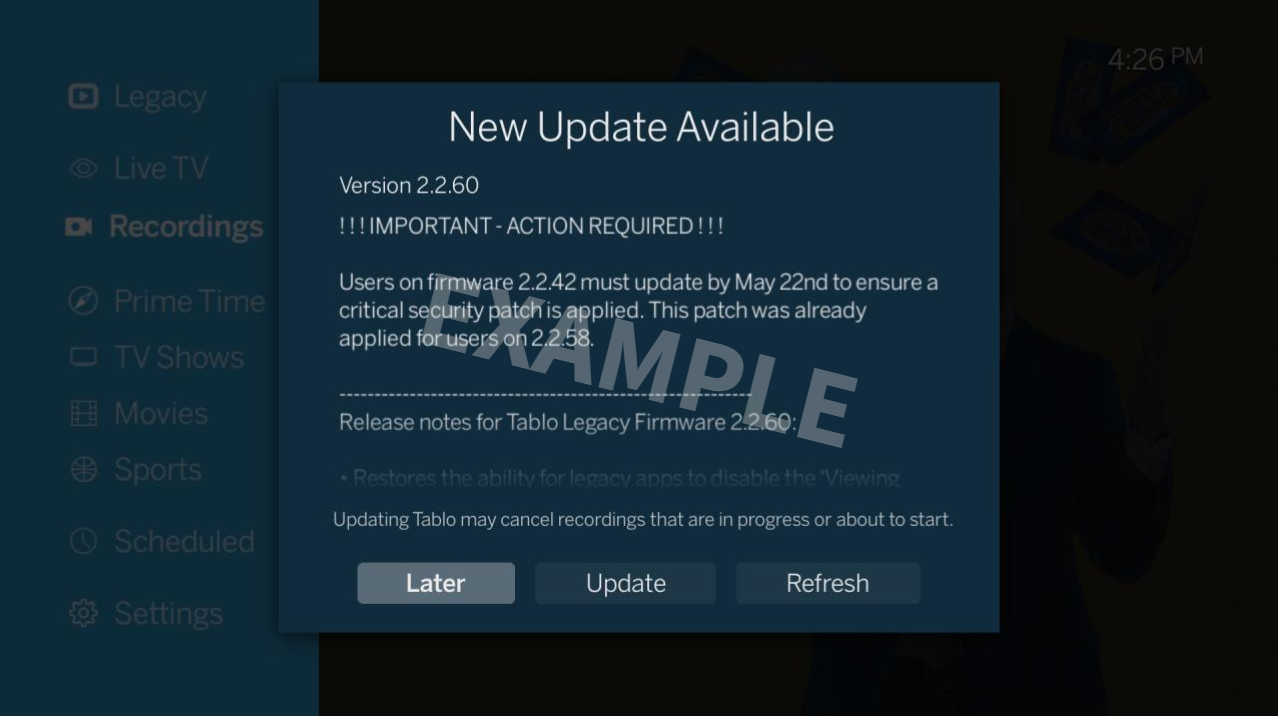
Here’s what you can expect:
Release notes for Tablo Legacy Firmware 2.2.60
WARNING: Users on firmware 2.2.42 must update by May 22nd to ensure a critical security patch is applied. This patch was already applied for users on 2.2.58.
- Restores the ability for legacy apps to disable the Viewing Data setting
- Refreshes missing cover art for completed recordings
- Fix for issue with a subset of devices where a lack of external storage can cause channel scans to stall
NOTE: Post-upgrade database processes (if needed) may take several minutes to complete. During this time the LED will be blinking. Do not power down the Tablo until the LED is solid again.
About This Release
The important things for you to know about Tablo firmware 2.2.60 depend on which firmware version your Tablo is currently running.
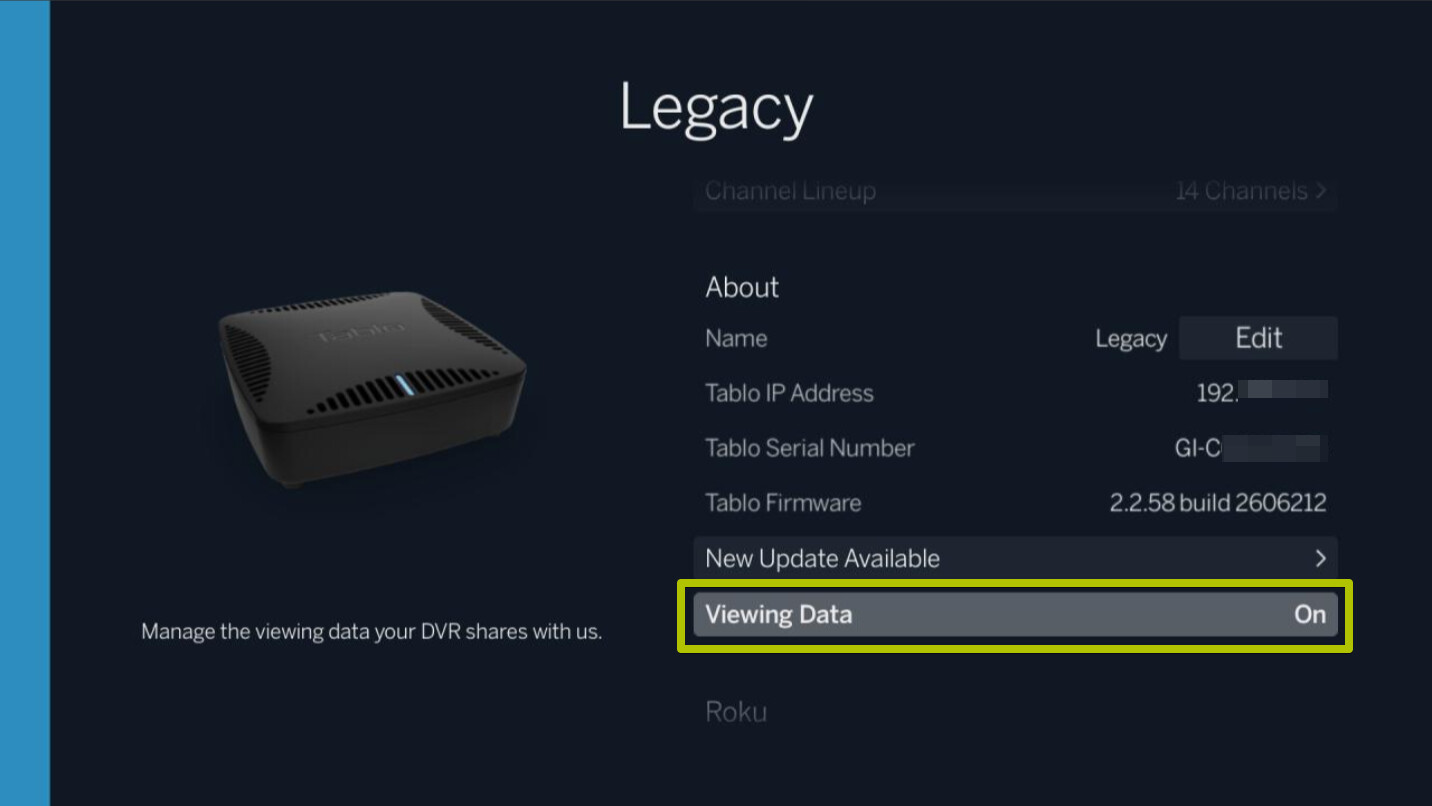
If you’re not sure which version your Tablo is running, go to SETTINGS > ABOUT > TABLO FIRMWARE in any Tablo app.
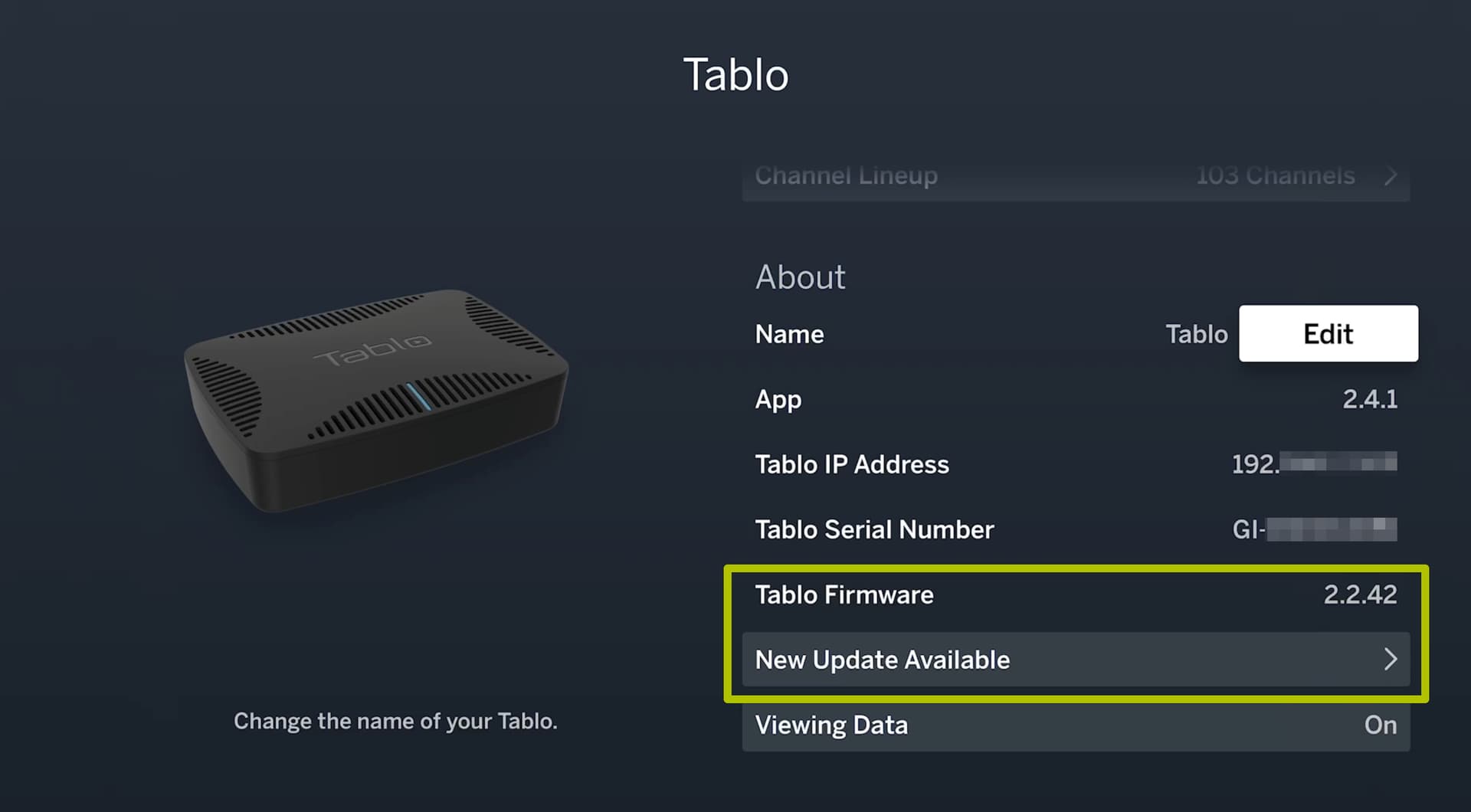
If your Tablo is running version 2.2.42…
Version 2.2.60 contains a critical security patch that must be processed by May 22, 2026. (This patch was already included in firmware 2.2.58.)
If you do not update your Tablo’s firmware before that date, connectivity between your Tablo device and Tablo servers will fail, impacting your experience in the following ways:
- Access to All Subscription Features Will Expire
Since your Tablo won’t be able to verify its subscription status, access to all subscription-enabled features will expire, including extended 14-day TV Guide Data, series and advanced recording features, Tablo Connect for out-of-home streaming and Automatic Commercial Skip.
-
Connectivity Through Some Tablo Apps May Fail
Tablo apps that rely on our servers to authenticate new connections may fail to discover or connect to your Tablo device. This could affect Tablo apps for Samsung and LG smart TVs, Windows 10 and the web app. -
Your Tablo Won’t Receive Updates
Tablo servers also manage firmware update notifications and downloads. If your Tablo cannot connect to our servers, it won’t receive any future firmware updates.
Processing this firmware update will allow you to continue enjoying your Tablo beyond May 22nd.
FAQs About the 2.2.60 Critical Security Patch
-
Which Tablo models require a firmware-based critical security patch?
The following legacy network-connected Tablo models require the application of a firmware-based critical security patch by May 22nd, 2026: Tablo DUAL LITE, Tablo DUAL 64GB, Tablo DUAL 128GB, Tablo QUAD, Tablo QUAD 1TB and the original 2-Tuner and 4-Tuner Tablo. If you have updated to firmware 2.2.58 or 2.2.60, this patch was already applied to your device. This patch isn’t required for Tablo DUAL HDMI, QUAD HDMI or 4th Generation Tablo devices as they use more recent and up-to-date security credentials. -
What does the critical security patch update do?
When Tablo devices connect to the servers at Tablo HQ, it uses specific security credentials to ensure that communication between the server and the device is protected and encrypted. The security patch in firmware versions 2.2.58 and 2.2.60 replaces older security credentials that are expiring with newer ones, extending the life of your legacy Tablo device. If you have already updated to firmware 2.2.58 or 2.2.60, your Tablo is now using the newer security credentials.
-
Was my Tablo or network at risk without this security patch?
No, your Tablo or home network was never at risk. Imagine this patch as your Tablo’s passport to Tablo HQ, which is expiring on May 23rd. The ‘border’ remains secure, and ‘passports’ included in previous firmware versions, including 2.2.42, will remain valid until then. But, if you don’t update your firmware to receive a new ‘passport’ before then, your Tablo will be ‘refused entry’ and won’t be able to obtain a new ‘passport’. -
Why couldn’t Tablo just keep the old security credentials?
Security credentials for devices and servers have set expiry dates, just like passports. Setting expiry dates is one of the best practices Tablo uses to help reduce overall security risks. -
I don’t want to use the new 4th Generation Tablo apps. Do I still need to update?
Yes. All legacy network-connected Tablo devices must update by May 22nd. Even if you never plan to enable the Legacy Transition and use 4th Generation apps, updating will ensure that connectivity between your Tablo device and Tablo servers can continue. Without it, access to all subscription-enabled features will expire, connectivity through some Tablo apps may fail and your Tablo will no longer be eligible to receive updates. Updating to 2.2.60 WILL NOT prevent you from accessing your Tablo through the legacy Tablo apps you use today or alter the features available to you within legacy apps. -
I have a different Tablo model. Does my device need this security patch?
This patch isn’t required for Tablo DUAL HDMI, QUAD HDMI or 4th Generation Tablo devices. As comparably newer devices, they use more recent and up-to-date security credentials.
If your Tablo is running version 2.2.58…
Version 2.2.58 contained a change that caused the Viewing Data setting to default to ON in legacy Tablo apps.
Sharing of viewing data was inadvertently re-enabled for devices where Viewing Data was set to OFF. The update also prevented changes to the setting within legacy Tablo apps.
Affected users will receive an email notifying them of this lapse in our viewing data collection processes and outlining the steps we are taking to rectify it.
Users who had Viewing Data set to ON before updating to 2.2.58 were not directly affected by this issue.
Firmware 2.2.60, which is rolling out now, restores the ability to disable the Viewing Data setting.
Please update as soon as possible and ensure your preferred Viewing Data setting is selected by going to SETTINGS > ABOUT > VIEWING DATA.
FAQs About the Viewing Data Setting
-
How do I know if the Viewing Data setting issue affected me?
This issue only affected users who met ALL the following criteria:
~ Own a legacy network-connected Tablo model
~ Had Viewing Data set to OFF in settings
~ Updated to firmware 2.2.58
We have also contacted affected users directly via email, where possible. -
After I update my firmware to 2.2.60, will my Viewing Data setting revert to OFF automatically if it was OFF before updating my firmware to 2.2.58?
No, the Viewing Data setting won’t reset automatically if it was previously set to OFF. We encourage all users to update as soon as possible and then ensure your preferred Viewing Data setting is selected by going to SETTINGS > ABOUT > VIEWING DATA. -
My Viewing Data setting was set to ON. Would this issue have affected me?
No. Users who had Viewing Data set to ON before updating to 2.2.58 were not directly affected by this issue. However, it is possible that users were indirectly affected because this issue also prevented changes to this setting within legacy Tablo apps. -
I never updated to firmware 2.2.58. Would this issue have affected me?
No. Users who had not yet updated to 2.2.58 were not affected by this issue. Furthermore, updating directly from firmware 2.2.42 to the newest firmware 2.2.60 will not trigger the issue. It will also ensure that your legacy Tablo DVR receives a critical security patch that must be applied by May 22nd. -
What does the Viewing Data setting do?
When Viewing Data is set to ON, your Tablo will collect data around your viewing habits. We collect the data for a variety of reasons as explained in our Privacy Policy. -
What’s the difference between the Viewing Data setting on legacy Tablo apps, and the Your Privacy Choices setting on 4th Generation apps for legacy Tablo users?
The Viewing Data setting on legacy Tablo apps and the Your Privacy Choices setting on 4th Generation apps are both device-level settings. This means that if you edit the setting, that choice is changed on your Tablo itself and reflected across all Tablo apps. However, they differ slightly in function. Legacy Tablo devices and apps will not upload any information about what you’re watching when Viewing Data is set to OFF. That applies to content you view through legacy apps or 4th Generation apps. If your Viewing Data setting is ON in a legacy Tablo app, that data will be uploaded regardless of which app you’re viewing from. However, if you choose to also enable the Your Privacy Choices setting from a 4th Generation app, data on your viewing via 4th Gen apps won’t be shared or sold. Bottom line, you have control over what data you share with us, no matter which Tablo app you use.
General Firmware Update Help
If you have trouble connecting to your Tablo after the update, wait 10 minutes, then reboot the Tablo and try again.
For other tips and tricks on successful firmware updates head over to the Knowledge Base.
Otherwise, if you have any feedback or questions about this release, please post them below.
If you need support, place a ticket and we’ll be in touch soon.