Tablo 4 app and roku

Trying a fix - reloading the Tablo App.

Delete the app on Roku (* on Remote and select delete app). Then restart the Roku (Settings, System, Power, Reset) or just disconnect power to the Roku for 20 sec. Then re-add the Tablo App.

We’ll see if this trick “fixes” the issue or not.

gatorgogo
I have the same issues. I have a Roku Ultra 4670X, currently running 12.5.0 build 4175-46 (current.) I’m using the Tablo 4th gen with firmware 2.2.46. The Tablo TV app (new one) is version 0.8 build 100. The TV is an older Sony Bravia 55 inch.

I have tried both wired and wireless networking on both the Tablo 4th gen and the Roku Ultra, does not fix the issue.
I have replaced the ethernet switch that the devices are using. No fix.
I have factory reset the Tablo 4th gen and the Roku Ultra at least a dozen times. No fix.
I have tested WITH an SD card installed in the Roku Ultra, and without. No difference.
I have uninstalled the Tablo TV app on the Roku Ultra, rebooted the Roku, reinstalled the Tablo TV app. Problem remains.

Every time I do the factory resets on the Tablo, I now perform the “guide” workaround steps using the instructions that Tablo emailed last week. At least the guide looks OK using that workaround.

If I play any 720 or 1080 stream (OTA based) from the Tablo TV 4th gen to the Roku Ultra 4670x, the Tablo TV app will apparently crash after 3 - 3.5 minutes. Very repeatable. Any of the Tablo 4th gen FAST channels don’t crash. Streaming any 480 OTA streams don’t crash.

The SAME Roku Ultra 4670X connected to the same Sony TV works flawlessly with my Legacy 4-Tuner Tablo.

The Tablo 4th Gen streams fine to: A 40 inch Phillips RokuTV, and a 55 inch TCL Roku TV. So the issue is specifically on the hardware in the 4670X. I believe the issue began after Roku rolled out version 12 of Roku OS.

I submitted a ticket. Tablo Support did remote into my 4th gen, said they couldn’t find anything wrong. They suggested using a different streaming+TV device in the bedroom…

My Legacy 4-tuner has been flawless for over 2 years. IMHO the Tablo 4th generation software, specifically for Roku devices, needed more QA time before a public release.

I’d even volunteer to ship my Roku Ultra 4670X to Nuvyyo support (since apparently they don’t have one) if it would help other Tablo 4th gen customers on Roku…

As you can tell, I’ve spent HOURS testing this. Quite frustrating. I like the new UI on the 4th generation Tablo, but I’m losing faith. HD HomeRun and a local Plex server is looking better and better all the time.
Thanks for all your work and info. The time I’m spending trying to make this work translated into dollars is making cord cutting very expensive. I just got this 4th Gen and it ruined Monday Night Football. I am cancelling a get together with friends for next week because the Tablo in not dependable. I guess the people who are trying the new 4th Gen are part of their R&D, but paying to use it instead of being paid to help them work out the bugs.

Wow, you have really tried to get this to work!

I was able to “fix” my problem initially using a more current Roku Ultra (4802X) on my older Visio TV. But had to move the 4802X back to another TV and reinstalled the older Roku Ultra (4670X) (it had the 12.5.0 Firmware) on the older Visio TV and discovered that it started playing 720P and 1080i channels - but only for 3 minutes and crashed. I attributed getting it to play was due to the 12.5.0 Roku firmware

I then updated the Tablo with the 2.2.46 Firmware and then removed Tablo App from Roku, Power Reset the Roku, then added the Tablo App back in and the Tablo App started working and didn’t crash. I guess I was just lucky, I don’t know.

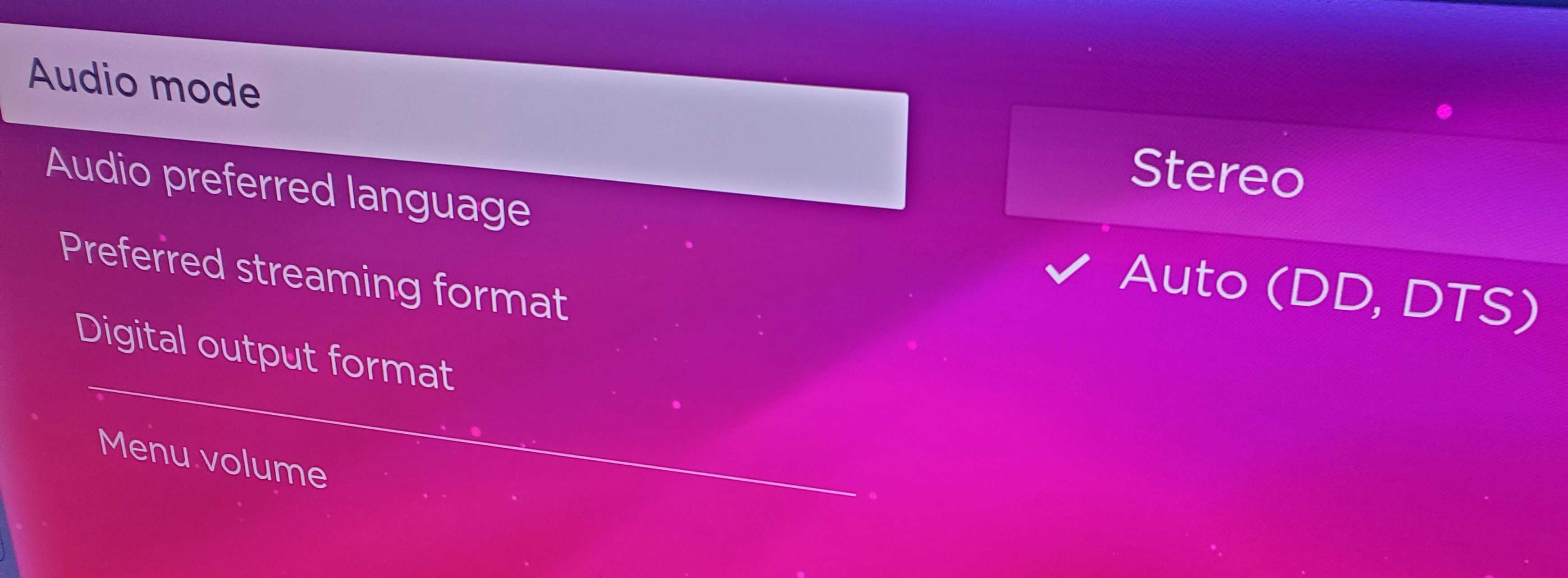
Just to check, did you set the Roku to Audio, Audio Mode, to “Auto”. The TV needs to be able to accept DD input.

I spoke too soon!

I just re-tested the 4670 Roku on my older Visio TV and after 3 minutes of watching Live TV - the Tablo App crashes! Just like David_G is experiencing and what I thought I had fixed… NOT!

I don’t use this TV very often, so I’m just going to wait until either Roku and Tablo can figure out what’s going on. Or just get a more updated Roku Ultra when they go on sale.

This is just a guess on my part, but I really think the older Roku 4670X is having problems transcoding the DD+ Audio to DD which is what my older Visio TV can play.

Maybe the Tablo Support Team can confirm my assumption that the new Tablo Gen4 is actually sending DD+ audio to the Roku?

I think the reason why the newer Roku 4802X works is that it has more memory and apparently can handle the DD+ to DD transcoding to my older Visio TV.

I have the Roku Ultra 4800x and Tablo 4th generation. The Roku Tablo 4th gen app is terrible, I also have the live view problem of it randomly going back to Roku home. Both the Roku and Tablo are Ethernet connected with a fast fiber internet connection. The Roku app for Android phone works well. But the Roku Tablo app has constant, and intermittent guide problems of guide data not loading past an hour or two from present. I followed the instructions to delete the Tablo app, re scan channels on Andriod Tablo app, and restart Roku, which works to fix jumbled guide channels, but fails to address the slow update of the guide. The Roku itself works fine for streaming video, no problems at all.
I finally gave up on Tablo software developers and bought a Firestick 4K. That device has a Tablo app that just works. Guide data is nearly instantaneous.

Changing Roku Settings “Audio mode” from “Stereo” to “Auto (DD, DTS)” fixed the issue for me.

I have an older Roku Ultra (4660RW) which would not play any videos in the Tablo 4th gen app until I made this settings change, but now is perfect. Both my Tablo 4th gen and Roku are on wired ethernet.

Thanks all for your helpful posts on this thread.

1 Like

Here it is July 2024 and they still have not fixed this problem. The guide is jumbled half the time and it randomly kicks me out of the app back to Roku home screen. Has anyone found a real fix for this yet?

have you updated your Tablo and Roku to the latest version?

1 Like

Along KimchiGUN’s questions, which Roku device are you using?

I just setup a 4th Gen 4 tuner Tablo and can not get the app to work correctly on my Hisense Roku TV. It won’t load all the available channels and when I try to watch a live channel, it freezes and crashes the Tablo app. The TV is connected via wifi and the signal strength is “excellent” according to the the network settings on the TV. The TV is maybe 5 years old. Is my Roku outdated? I also have a Firestick enabled TV which works fine. Is there a way to update the Roku app on the TV?

Does your firestick work with Tablo?

What Roku OS is your TV on?

The processors in TV’s are often lower powered and a generation or two behind standalone Roku devices. It’s probably just not powerful enough, and may not have enough memory (RAM, not storage.)

1 Like

The first thing to try would be to uninstall the app, reboot, reinstall.

I’m not sure if the remote combination works on Roku TVs, but you could also try doing that to force a reboot and cache clear.

However, your TV may be too underpowered or old to use the app properly. There are many cheap STBs you can try (onn 4k box for example), but if you’re going to stay in the Roku ecosystem, I would recommend nothing cheaper than a Roku 4K Express +.

1 Like

We’re hoping to get a Roku update out this week with several fixes and another one is hot on its heels, so hopefully things will be much smoother for everyone moving forward.

2 Likes

This topic was automatically closed 365 days after the last reply. New replies are no longer allowed.