New Votable Tablo Feature Request Category
Hi folks -
A recent update to the Tablo Community forum now allows for a votable feature request category. 
This allows you to submit feature requests and vote on ideas that would make using Tablo more enjoyable for you. It also allows us to accurately gauge which potential features are the most popular with users.
We’ve pre-populated this section with a few frequent feature requests from the last few years, but we’d love more input from you!
How to Submit a Feature Request
To ensure requests are accurately described and aren’t duplicated, new topics within the Feature Request category have a template and must be approved before they appear.
Do not put multiple features within a single request.
- In the top right of the Tablo Community forum, select NEW TOPIC.
- If you’re already in the Feature Request category, you’ll see the template immediately. If you’re not, choose Feature Request from the category drop down.
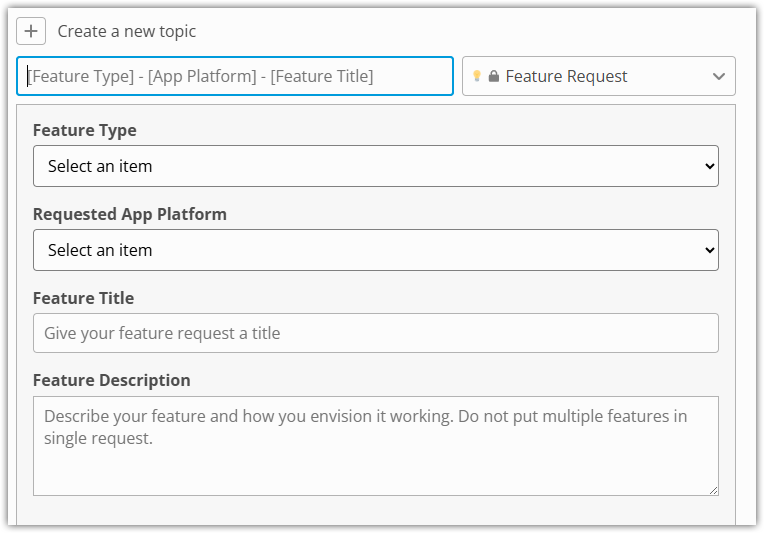
To ensure other users can easily browse and vote for features, the title of your feature request should include three items, separated by dashes:
- FEATURE TYPE: Please type NEW for brand new features, CHANGE for a request to change or improve the behavior of an existing feature, or PARITY for a feature that exists on one Tablo app but not another.
- APP PLATFORM: Please indicate the Tablo app platform on which you’d like your feature to appear, e.g. ROKU. If you’d like your feature to appear on all apps, type ALL APPS.
- FEATURE TITLE: Give your feature request a title that quickly explains what you’d like the feature to do, e.g. Tablo Connect for out-of-home streaming.
For example, NEW - ALL APPS - Tablo Connect for out-of-home streaming
Then you’ll need to select a FEATURE TYPE and APP PLATFORM from the drop-downs in the topic template.
Then you can re-use the short Feature Title from your topic title above for the FEATURE TITLE section of the template.
Finally, in FEATURE DESCRIPTION describe your feature and how you envision it working to the best of your ability.
How to Vote for a Feature Request
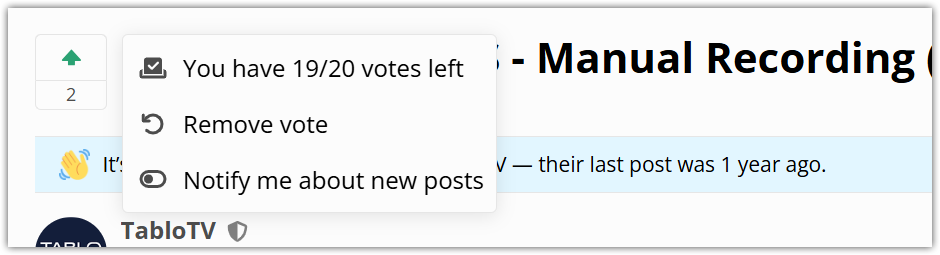
When you click on any existing Feature Request, you’ll see a small widget on the far left with an up arrow.

Clicking on the up arrow will add your vote, turning the arrow green. It will also allow you to remove your vote and indicate how many votes you have remaining. Each user gets 20 votes, so make sure to use them wisely!
What’s Happening With the Old Feature Requests Category?
As we transition to this new style feature request section, the older section has been set to read only, meaning users cannot add new topics or reply to existing topics.
This should allow you to review any previous posts you’ve made in that category and transfer your requests to the new category. Later next month we’ll remove access to that category to avoid any potential confusion.