A while back I could move the highlight to a recorded show and just press the play button on the remote to immediately begin watching the recording. Then at some point an update came along and killed that neat ability. At that point I was forced to highlight the recording. Then press the middle OK button. Then press the OK button again to begin playing. It was irritating.
Moments ago I had a recording selected and mistakenly pressed the play button and to my amazement, the former functionality is back! Yay!
So this causes me to ponder the following. I used to work with computer software. And each time a new version was released, there were release notes one could read that listed features and changes.
Does the Roku app offer any ability to view release notes?
Any release note you might find for any product nowadays will only have a general overview or summary of what’s ‘included’, like Security Enhancements or Bug Fixes. I use Home Assistant and they’re pretty good about documenting changes. Fortunately, you’ll also sometimes get good release notes from Tablo…
Unfortunately, you won’t get a list of undesired changes, bugs, or breaks.
I just checked that option with my Amazon Fire TV and that also works for me in addition to my Roku TV, where you highlight the show and press the play button. My Android TV (TiVo Stream 4K) does not have a play button, so the only option is to hit the select button. (Unfortunately the Amazon Fire TV app is slow as molasses, and in general, my Amazon Fire TV OS is slow as molasses. So, I would rather stick with either the Android TV app or the Roku app.)
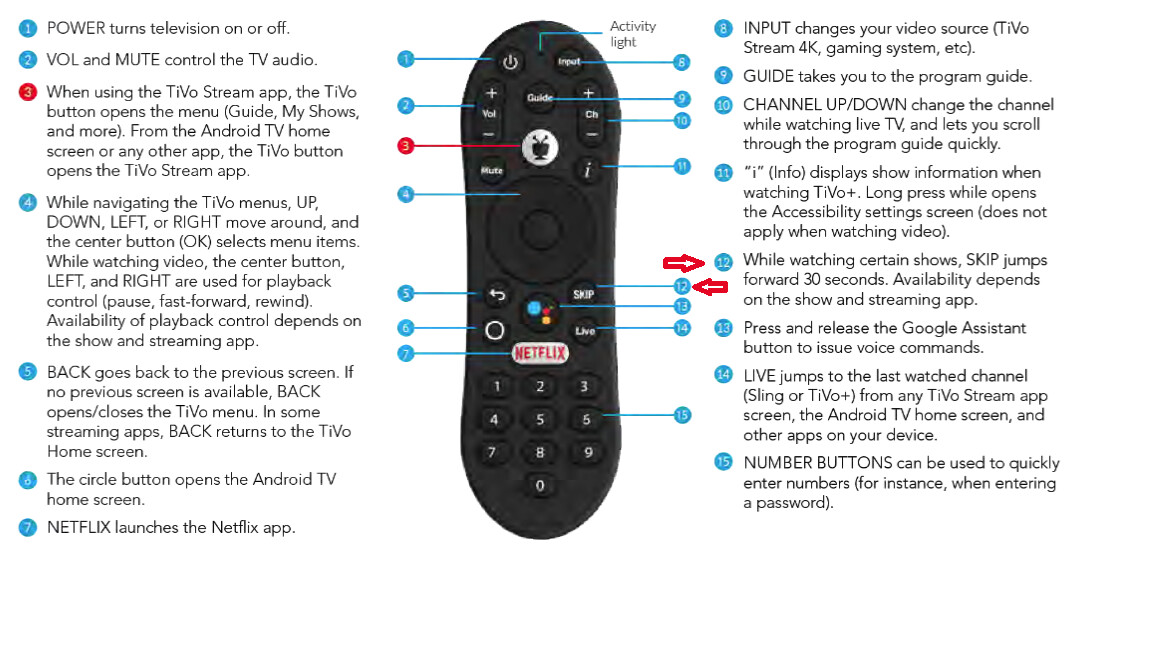
Another interesting aside, the TiVo Stream 4K has a 30 second skip, but I have yet to see any software that it works with.
LOL, just sharing a “well DUH!” moment I had yesterday. I use my tablo on Roku. I like to watch Kimmel and Colbert, so I record each. Nothing quite matches that satisfaction of zooming past commercials!
Well, as we all know, oftentimes actors and actresses appear on these shows to talk about things they are doing. And I often try to take notes such as “whatever” show is going to be on “whatever” service beginning “whenever”. I typically pause the playback, bounce over to the service and look for the show so I can add it to a watchlist or whatever.
Looking at that remote reminded me that I did this yesterday and totally spaced out that I had a dang Netflix button I could have easily pressed to bounce straight from tablo app to Netflix app. DUH! LOL
If I am doing something like that, I usually just grab my phone. I can open Tablo, Netflix, Prime, etc… on my phone and search these things without interrupting what I am watching on my TV.