We got the tablo because our previous DVR would not record UHF channels and our regular channels switched to UHF. If I navigate to a live show and start recording it, then I can play the recording and hear sound properly. However, I have not yet been able to make that work if I record the show in advance, which is of course what I want to do. When I first try to play the recording I get the message that there may be an incompatibility with the audio thingy. I have two choices, one to change the audio and one to cancel. No matter which one I choose, my show will not play at all. It simply jumps back to the listing under Today or, I presume, whatever would be the appropriate place for it. Anyone know what’s going on? I have a Gen 4 tablo and a Roku streaming device and they claim to be compatible.
Hello @Kathyk and welcome to the community.
It sounds like you’re using a Roku device for streaming. Unfortunately, anything recorded using the current configuration will not have sound. You’ll need to follow the article below to enable the fix. Anything you record afterward should work. Let me know if you’re NOT using a Roku device.
Also make sure your Tablo and Roku device are updated.
Enabling Audio Compatibility Mode for Roku on the 4th Generation Tablo – Tablo
Thank you for responding so quickly. I followed the instructions and it is still not working properly. I am trying to show the screen where we selected the OFF for the audio compatibility mode.
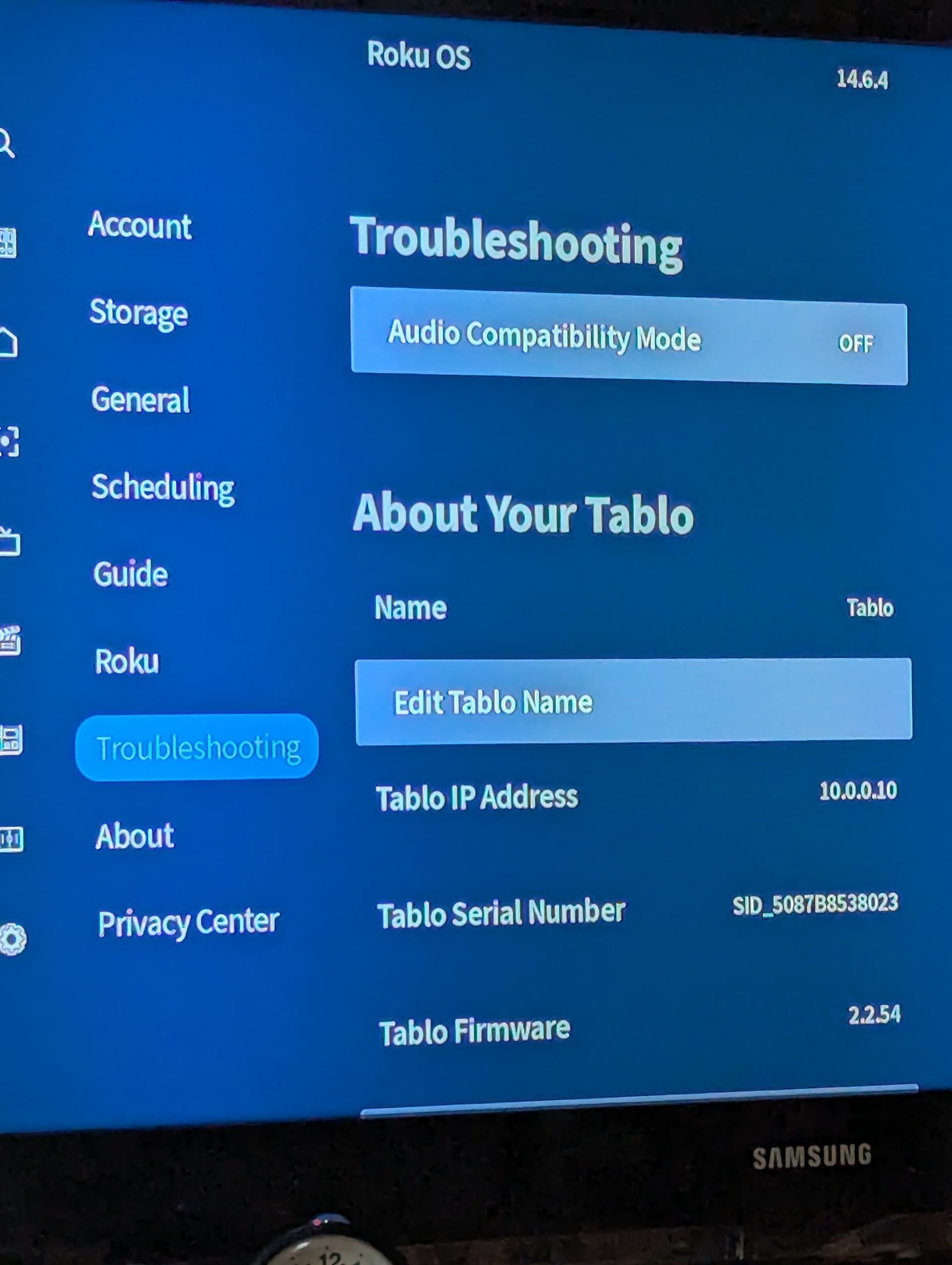
After changing to OFF we started recording a show. We could see the blue line progressing when we look at the show in the list. However, when we try to watch live, we get the second screen that I’m going to try to upload.
I don’t seem to be able to do that. At any rate, we have two choices: switch to AAC or cancel. No matter which one we select, we get thrown back into the library. It’s not a matter of it playing without sound. It will not play at all. Like I said in my original post, the Roku and the Tablo say they are compatible and working together. I don’t know what to do. I would rather not have to return the Tablo but I can’t figure out how to make it work properly.
I believe you should turn Audio Compatibility ON if you device is affected by Roku OS 14. This is shown on the bottom line of this table.
Hi @Kathyk,
Sorry about the issue you’re seeing. I can clarify some details for you.
When you select the Audio Compatibility Mode toggle, you will see a dialog pop up that will give you two options:
- OFF (Surround Sound AC3)
- ON (Stereo AAC)
On several Roku devices on Roku OS 14 and up, there was an issue with how the audio was decoded for OTA channels, causing the player to not function properly and close. Changing the audio type to AAC (Which is the ON option for Audio Compatibility Mode) should alleviate that issue for all future recordings. Oddly though, this issue should also affect live channels, so it’s definitely peculiar that you were able to watch OTA channels live without issue.
Regardless, just to clarify that after changing the Audio Compatibility to ON, you will only see the fix in shows recorded after that setting was changed. Anything recorded before that will unfortunately remain unwatchable, as when it records, it does it in whatever format is set at the time.
Let me know if you have other questions!
This topic was automatically closed 365 days after the last reply. New replies are no longer allowed.