So, this is interesting. Two weeks after Tablo support ended, my legacy Tablo is suddenly not connecting to my external hard drive. It is the same external hard drive I bought in 2016 when I bought the Tablo 4-quad device. Now Tablo isn’t finding it!
I’ve replaced the USB cord, unplugged the Tablo, tried a number of resets, but no dice! I can hear the drive humming away, but Tablo doesn’t find it. Cannot watch old recordings, and new recordings a faded out.
Can watch live TV thru the Tablo machine, but that’s all it will do.
So, what to do, and does Tablo still have some support/help that I can call for assistance even though it is after the 9/1 date that Tablo support ended?
I would replace the Tablo power supply as it may be degraded enough to cause problems for the HD. I had this same problem 1 or 2 years ago and that seemed to fix it. This was the one I used.
I ordered a new power supply cord using the link supplied by wysiwyggin (thank you for the link). I also plugged the external drive from my Tablo into my PC as justaluker suggested, but how do I check or what should happen to let me know if the drive is recognized by my PC? I can hear the drive “operating” but nothing popped-up to notify me that the drive was recognized. Whereas when I insert a thumb drive into my PC, a notification will pop-up to let me know that it recognized the thumb drive, but nothing happened with the external drive from my Tablo. Is that what should have happened when I attached the external drive to my PC?
The Tablo HD is formatted with EXT4. Windows does not natively support this format, so when attached to Windows PC you will not see it in My Computer (no drive letter is assigned).
However, you should be able to see the drive in Disk Management (right click Start button). You will not be able to see any files, only that a partition exists. Some have used 3rd party software that can allow Windows to mount and read EXT4 drives.
Be very careful in Disk Management, actions taken there cannot be undone.
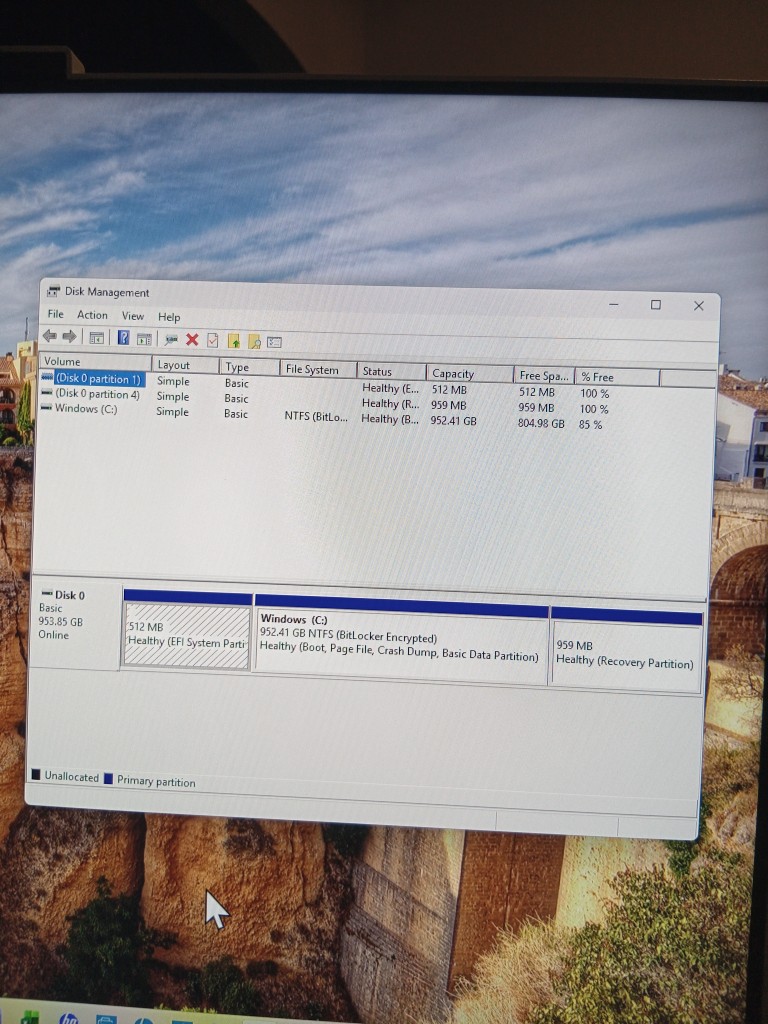
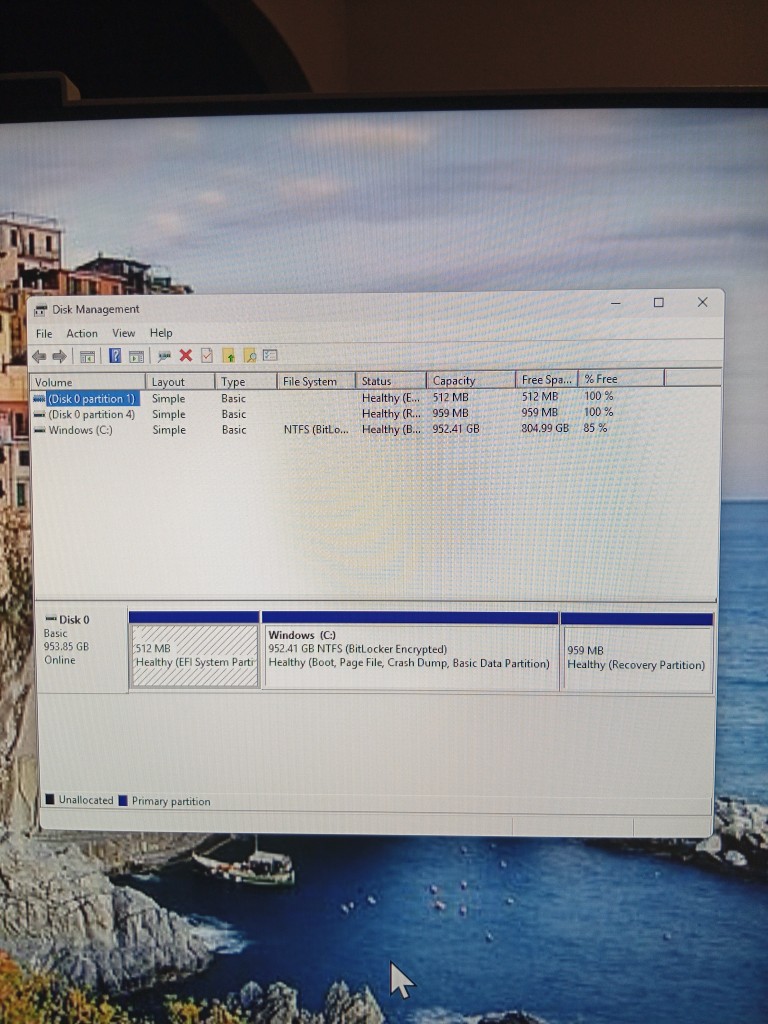
Thank you, mbellaire, for the your advise. I followed the instructions you provided, and have attached two pictures of what happened. The first picture is what the Disk Management information looks like BEFORE I attached the external hard drive to my PC; the second picture shows what the Disk Management looks like AFTER I attached the external hard drive to my PC. Maybe I’m wrong, but I do not see any differences between the two pictures. So, does this mean my external hard drive is no good?
Please advise.
Thank you, again, for all the comments and suggestions.
And, as I mentioned in my previous reply, I ordered a new power cord which is expected to arrive tomorrow (9/19).
Yes, there are two USB ports on the back of the legacy Tablo. I tried connecting to either one, no dice. I’m going to do a factory reset on the Tablo, but I doubt that will resolve the problem.
Looks like you need a new hard drive but first a question… does the external usb drive have its own power supply? If it does then that may be the problem and you should try a different power supply for the drive. If it gets its power from the USB cable then you have a bad hard drive.
As I said… “hearing the drive “humming away” might be a bad sign”.
The external hard drive has it’s own power cord to connect to an electrical outlet, and a slot to connect to it directly to the Tablo via a USB cable. And the drive only starts up when the USB cable is connected to the Tablo, even though it’s power cord is connected to an electrical outlet. If I remove the USB connection to the Tablo, the external hard drive seems to power down. This has been the case since we’ve had the Tablo.
Also, I think using the adjective, “humming” was not a good choice, on my part, to describe how the external drive operates when it is on. It still makes the same sounds of whirring, writing/reading, etc. as it did before I posted my problem. In other words, the sounds the external hard drive makes when active is still the same ones it has always made even though the Tablo is not connecting to it. Hope that clarification didn’t cause more confusion!
Thanks, again, to all for your postings and suggestions!
In my experience hard drives are really quiet when reading and writing. when they make noise doing either bad things are/or will be happening soon.
Troubleshooting this problem is really a 5 minute job if you provide ALL the important information. Successful diagnosis starts at SQUARE ONE and proceeds from there.
Is this a bare hard drive in an external dock or an encased “external” hard drive? If a bare drive in a dock what brand dock and model? If an encased drive what brand and model?
The problem is either the Tablo USB port, the Tablo power supply, the hard drive if a bare drive in an external dock, the hard drive dock itself or its power supply, or if an encased external drive that assembly or its power supply, or the USB cable.
Don’t the major disk manufacturers like seagate and western digital have disk utilities that not only reveal the S.M.A.R.T. information but also scan the disk for bad sectors. All this hocus pocus using disk management seems like a waste of time.
1). I reattached the external hard drive to my PC, then selected “Action”, then “Rescan Disks”. Did that twice, saw no change.
2). I bought a new USB cord to attach the External Hard Disk to the Tablo. That did not solve the problem.
3). Waiting on Amazon to delivery a new power cord for the Tablo, itself. It is to be delivered today. Will test it out as soon as it arrives. And your suggestion, wysiwyggin, was clear and hopefully that will resolve the problem. It was also suggested by a Tablo support member.
4). The External Hard Drive is an encased “external” hard drive. It is a Seagate, model #SRD0NF2.
5). Have not yet replaced the power cord for the External Hard Drive.
6). Have not yet done the factory reset, waiting to try other steps first.
7). I did buy a 4th Gen Tablo DVR, but not sure how good this product is. Three online retailers that I searched through had ratings that about 3.7 out of 5 stars, based on customer reviews. So, not sure if this is a good product, but if it turns out that my legacy Tablo is kaput, well, then I have it to use.