I wouldn’t wish that on an enemy. Then again maybe I would.
Since it sounds like it is repeatable and daily? Maybe it is some bug in the DHCP lease renewal. Even though you used reservation IP maybe there is some side effect throwing off Tablo? Just a guess but you could modify the DCHP lease time in your router to say 3-4 days and see if the problem shifts with that change. Not a fix but might help narrow in on things.
…" A reserved IP address is still subject to the DHCP renewal process. However, the reservation ensures that the DHCP server will always offer and reassign the same specific IP address to that device. The address doesn’t change, but the lease must still be renewed periodically."…
Does your firestick have the Silk browser? https://youtu.be/QKlaAv2iBB0 If so, try browsing to the IP address of your Tablo and see if you get a response. If you get a good response then the problem is in the Tablo app’s top secret device discovery mechanism.
Is your Firesticlk powered by the USB port on the TV? Did the Firestick come with an external power supply that you are not using? Sometimes the power supplied by the tv is marginal and is barely strong enough to power the Firestick. Low power from the tv wreaked havoc with my Roku device and it cleared up when I started using the supplied power supply.
Yes, Google told me that earlier today, too. When I logged in to my router, though, I didn’t see that option available anywhere. So I Googled that, too, and was told, “You cannot directly change the DHCP lease time in your home’s Cox network because this is managed by Cox’s servers, not your personal equipment.”
One other thing…are you exiting the Tablo app before turning off the TV? Make sure you properly exit the Tablo app.
1 Like
I had forgotten about this problem. My ONN device had the same issue, if you didn’t exit to the HOME page it would be quite problematic the next time you tried to start it. I think this is common on a lot of the Android-based devices.
Well they may be referring to the DHCP service that provides the WAN IP address from the network to your home. That would be rightly the role of COX.
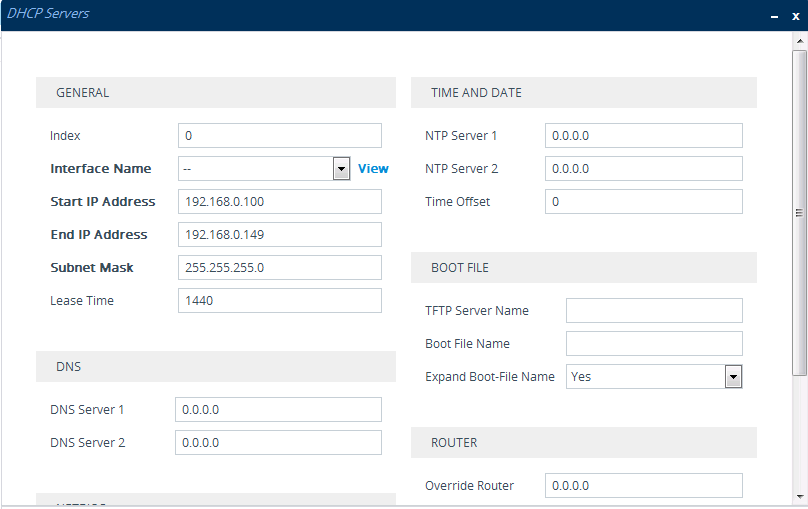
We’re talking about the DHCP server on the LAN side of the home router dishing out IP addresses for local devices. That is typically configurable through an advanced tab somewhere in the router config web pages. The fact you can assign a reserved IP address (a setting in the LAN DHCP server) suggests some user configuration is allowed. I would scan all the tabs in the LAN router settings and see if you find something similar to below.. It could be Cox is restricting this to simplify their customer support burden but that is not certain. The lease time in the table below is 1440 seconds which is exactly 24 hours which suspiciously aligns to your problem case. MAybe just coincidence, maybe not.
A ton of ISP provided routers don’t let you configure much of anything. Just saying. So, when there’s a problem, a problem that you could easily fix, you can’t.
I just recently had such an event on my ATT provided router. What is interesting is that the same router, 10 years ago, had more settings I could adjust. People are sheep to be exploited…
@User1652, When you turn on the Tablo and get the spinning circle, try pressing the ‘Back’ button on your Firestick. Mine does that quite often (spinning circle when starting the Tablo app), and pressing the back button almost immediately brings up the Tablo starting screen.
I prefer not to use the ISP provided router due to it now having enough horsepower.
like @KGBnut mentioned… I have an Onn Box Pro. My wife doesnt like exiting the APP properly and it sometimes borks. After closing the app properly and reopening it, it works fine. Especially if it sits over night like that. It borks heavily.
No, it is plugged in to the USB port on the TV with its power cord running to the outlet (via a surge protector). The TV is not supplying it with power, its power cord is.
We’ve done that, but it made no difference.
Google told me about the lease time, too. I looked everywhere on the router settings and found nothing.
I will be sending Tablo back. I e-mailed their support team three days ago, a few minutes before I posted this question in this forum. They have not responded at all. And yes, I checked my spam folder. I will not keep a product where their support team doesn’t answer the need for assistance. I have made every effort to get Tablo to work.
I tried that, it didn’t work.
Is it plugged into the USB port or the HDMI port?
I just unhooked everything a few minutes ago to send it back. Everything was hooked up exactly as the insert in the Tablo box instructed, with the equipment they provided. I e-mailed their support team three days ago, a few minutes before I posted this question in this forum. They have not responded at all. And yes, I checked my spam folder. I will not keep a product where their support team doesn’t answer the need for assistance. I have made every effort to get Tablo to work.
We’ve tagged support, your ticket has been escalated and they’ll contact you soon.
Has the problem been resolved? My Tablo is exhibiting the same problem and I need to know how to fix it.
It’s probably a setting in your router (eg channel, bandwidth). Are you using 2.4GHz or 5GHz?
Would be helpful if the OP had posted Tablo’s response.