I would like to be able to watch my shows on the road, was really bummed when I learned tablo 4th gen doesn’t support this. Has anyone setup a vpn and/client that allows them to get to their tablo4th gen from the road? If so can you share settings (and which type of vpn) I tried setting up, and it just doesn’t seem to find the tablo.
On my phone I have used a vpn client connection (wireguard) to my home router and that has worked. I currently use Tailscale and that works well also. Tailscale is installed on my phone and setup on my router.
thanks, any special setup on vpn (on router), any port forwarding or anything else special, I tried vanilla wireguard without luck
I’m using an OpenVPN client on my mobile devices to connect to my Tablo v4 that’s behind an OpenWRT based router which supports both Server and Client VPN services for OpenVPN, WireGuard, and Tor, and other VPN services like Tailscaale.
If it’s not working when your VPN client is connected to your home network, then try enabling IGMP Snooping if it’s available on your router which might help.
Site to site VPN
@joelchrisn on my router (VPN Gateway) I had to ensure I checked the box that allowed VPN clients to connect to things in my LAN otherwise I would only have been able to manage the gateway. Not sure what make/model router/gateway you use so I couldn’t say what setting needs set on yours.
This past weekend I was travelling and had the chance to try using Tablo over the Tailscale VPN and my Wireguard VPN connection. Using the Wireguard VPN connection everything on Tablo (that I tested) worked. Live TV and recording playback. Over the Tailscale VPN, I was able to connect to the Tablo and view live FAST channels but I could not view any OTA channels. I’m not sure why. I am researching this.
1 Like
Well, I’ve tested this numerous ways and what I’ve come up with is if the device inside your LAN has tailscale and it is setup as an exit node and a subnet router then I can view all the OTA channels remotely on my phone as long as my phone is using the exit node. If I turn off the exit node on my phone I get no OTA.
Has anyone else experienced this or have any thoughts on why this would be?
Check if ALG option in your router is enabled or disabled.
I run a L2TP VPN on my home router/firewall to I can remote in per my iPhone and watch Tablo. Also through my Windows Laptop and watch Tablo through BlueStacks.
If you’re looking for a real cheap and easy router, I would look into a AmpliFi. All done by the phone app and super easy VPN methods.
I’ll have to check. What should it be set to?
It should be checked… some routers have it disabled.

My router has it called SIP ALG and it is disabled by default.
SIP ALG is for SIP phone protocol (Wifi Calling and or SIP phone service) and not VPN ALG. Seems like your router doesn’t have VPN ALG.
1 Like
Thanks everyone for the suggestions, I have a TPLINK AX1800 router, for some reason when I configure VPN server & client of WireGuard, it does not work, today I tried configuring using OpenVPN, and it works with the default settings. I have no idea why OpenVPN works and wireshark does not in this case, but glad I got it working! (I use IOS for the client). Seems to work pretty great over AT&T mobile network LTE from near by, true test will be the next time I travel!
1 Like
Thanks for the clarification.
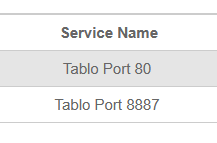
I am curious about the point to point vpn option, does anyone know what ports are used for Tablo? Thinking I could route just that traffic over vpn from my remote place. (The idea here would be I have a beach house, and I want to be able to watch my Tablo at my main house, could I route just that traffic over the vpn.. routing everything would be a bottleneck)