Found this elsewhere, I can’t take credit…
https://tvlistings.gracenote.com/grid-affiliates.html?aid=orbebb
Signed in as usual, remembered me & all my settings. “Zap2It” still has a heartbeat! >; )
3 Likes
Welcome to the community and thanks for sharing. I was also able to sign in using my account. My old link didn’t work, but it’s strangely similar to the one you provided, which does work.
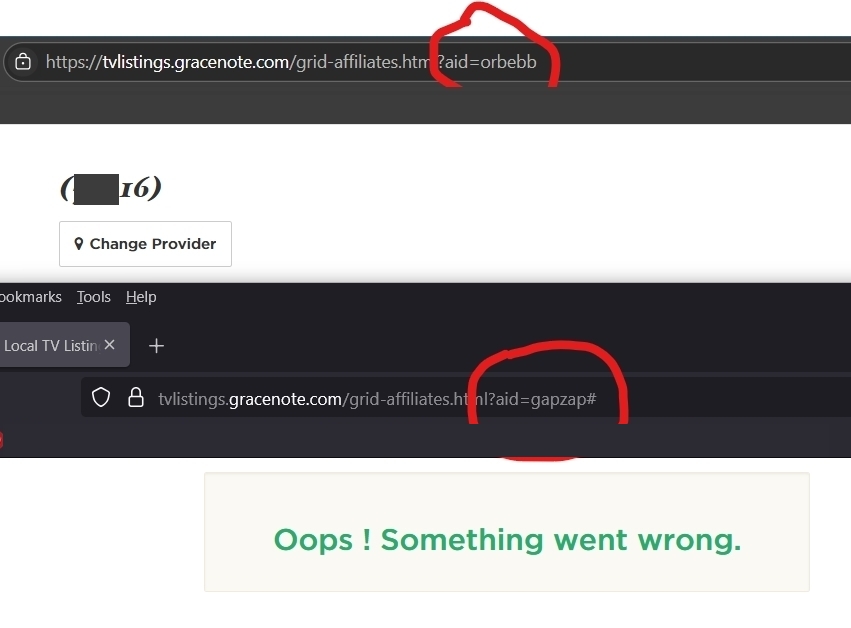
2 Likes
Thanks @DavyCrickett That works for me as well.
1 Like
My newly discovered working “Zap2It” link is near the bottom of this thread, as you kindly acknowledged, Wysi. Been using “Zap2It” it exclusively for decades. I compared it to “TVGuide.com” back when, it beat it then, it still beats it. But…
Your suggestion of TitanTV ain’t bad! I’ve been playing around with it. Lots of customizable options. I can see myself referring to both in tandem. Or at least keeping TitanTV in my back pocket for the next rainy day. Thank you, wysiwyggin!
1 Like
This worked for me. Thanks.
Yes! Thanks, this is great. Hoping this site sticks around.
1 Like
I created an account here just so I could repost this link (from DavyCrickett above–thanks Dave!!) Gracenote still works, the url ending has changed: TV Listings- Find Local TV Listings and Watch Full Episodes Really, it’s hands down the best(!) TV listing grid–very easy on the eyes, it’s just perfect!
1 Like
tvlistings.gracenote url not working?
THIS SOLUTION WORKED FOR ME in the USA as of Jul 28, 2025:
Edit the end of the url you used for Gracenote.
from: ?aid=lat#
TO=> ?aid=tribnyc2dl
NOW I have: https://tvlistings.gracenote.com/grid-affiliates.html**?aid=tribnyc2dl**
NO CODING NEEDED.
The showtimes.com/tv listings were working well until today. Now the page is downloading for a long time and sometimes doesnt complete. It used to load instantly. Its downloading about 20MB based on my counter. There is something suspicious about a text only webpage using that kind of bandwidth.
I just clicked on the link you posted and it worked fine for me.
This worked for me, too, but… there used to be a Print icon where you could print the listing, and now it doesn’t show up. I need to print the listing for an elderly non-computer user. Any workarounds?
@Tivoglio, I personally don’t recall a print icon. HAVING SAID THAT… I just tried to print using my browser’s print option. It seemed to do the trick for what was on the screen at the time. I don’t know if there was a better format or selection process using the previous print icon, but this is ‘a’ workaround. Good luck! (I’m elderly as well)
I remember it as well. Never used it though…
Using CTRL+P should also open the Print dialog with a preview of the print job. You can also use the More Settings link or button near the bottom of the Print dialog to change the scale and print background.
I wasn’t able to open Gracenote, so you can also try Showtimes.
TV Listings - Find Local TV Listings and Watch Full Episodes
Unfortunately, I tried Showtimes and printing didn’t work for me.
Starting to lose channels in the Tv guide.
I’ve tried multiple providers.