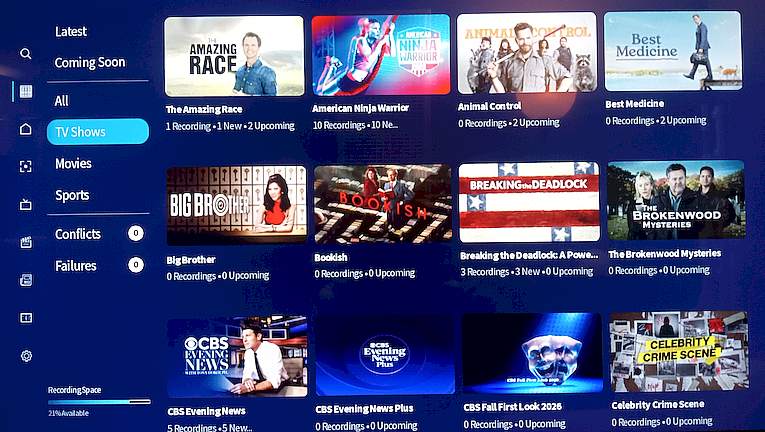
The Library needs a page that only shows programs with recordings. It works “correctly” with the Google TV 4th gen Tablo app, why not with the Roku TV 4th Gen Tablo app?
(see screen shots below…)
This is the “TV Shows” view using a Google TV Onn 4K device with the 4th Gen app. This view lists all shows with recordings. Like the Legacy app did. This is the view I need.
This is the “TV Shows” view with a Roku TV using the 4th Gen Roku app. Notice how it shows many shows that are scheduled but have no recordings. Why does the Roku app have this problem? I need a way to exclude shows that have no recordings. For now, I’ve plugged an Onn device into my Roku TV and I’m using the Onn device! Because the Google TV app doesn’t have the the Roku app problem.
Absolutely! This is a horrible UI feature. The other thing that is desperately needed is to bring back the little icon in the top right corner of the recording image which indicates new episodes are available. It is abundantly clear no on looks at this ui on a smaller TV from across the room; seeing “3 New” in small text is nearly impossible.