Thanks for the quick feedback. Might take advantage of it being on a decent sale at the moment.
I always go wired this type of stuff, it would be setting in my open (no doors) entertainment center next to the Tablo and an 8 port UniFi switch. 
Thanks for the quick feedback. Might take advantage of it being on a decent sale at the moment.
I always go wired this type of stuff, it would be setting in my open (no doors) entertainment center next to the Tablo and an 8 port UniFi switch.
Yeah I just got fiber (5 Gbps) this weekend also, just wish more of my devices could actually take advantage of it. 
You are not a good influence @joedv.
Your quick response means I’ll have it in my grubby hands tomorrow morning. Even looks like it comes with Windows 11 Pro, so I can use built in RDP to access it.
@Nilex yup, that’s what I have, it’s headless, just rdp into it whenever. I did have to get a HDMI emulator dongle for it so when remoting in the screen wasn’t in 480. So you might need one of those as well if you won’t have a monitor. It was like $15.
I’ve got an extra monitor I can use with it for initial setup, which happens to be sitting right next to another 5 port UniFi switch.
Stuck at 1 Gbps currently for my ISP, but that’s plenty for what I do and being 100% WFH.
I had 1 gig as well and it was fine other than the constant going out every other day. They just put fiber in my neighborhood so jumped on it since it was half the cost I was paying and got the 5.
Had Spectrum before a local fiber company came in and similar situation, paying less now for gigabit then I was paying Spectrum for 500/500.
Good news is the fiber company is WAY more reliable then Spectrum was. Only one outage since we got it almost 3 years ago and it was an HVAC in one of their POPs going bad later afternoon and they had already planned on replacing it and moved it up to ASAP and had service restored the following morning.
Had to resort to reading for that evening though. 
@joedv Some feedback on the commercial skip in 1.3.4, which I installed yesterday (11/03/2026).
Tested it with the new Scrubs episode that aired tonight (11/04/2026) on ABC, S2E7 “My Story”.
It missed the commercial break that was from 2:26 to 4:24 entirely.
It marked the commercial break that was from 13:25 to 17:04 perfectly.
The final commercial break of the episode should have been from 26:26 to 29:40, which is when it went back into the show for the last 40 seconds. Instead it marked from 26:26 to 30:26.
We do a lot of watch and delete and I got trigger happy before I thought to grab any screenshots or save the episode for export if you wanted to look at it, sorry about that.
I do understand that commercial skip is an inexact science, and I’m quite happy with how things are working overall already, just wanted to provide some feedback.
If you want more, let me know and I can provide details on recordings from the other 3 major networks as we watch them (sorry, no CW or PBS shows that we watch consistently). If not, tell me to take a walk.
EDIT on 11/05/2026:
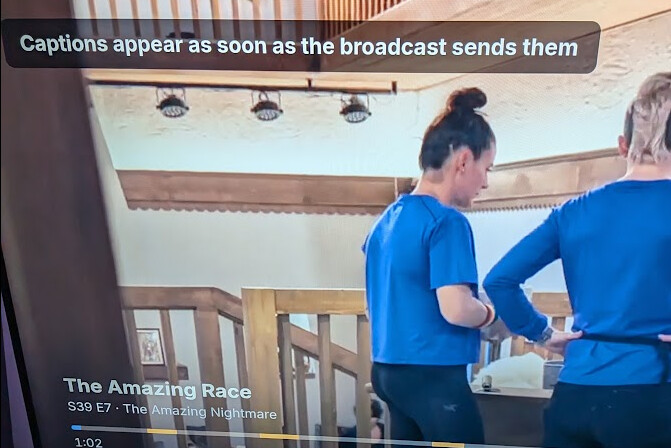
Encountering an odd issue with close captions, not sure if it started with 1.3.4 but I think it did.
I know I’ve been using close captions with no issues recently but now when I try to turn them on I get this:
@nilex I’ve been trying to improve the commercial skip as best I can. It’s kind of a pain in the rear honestly because every channel, every show, has there own little way of doing it and programmatically trying to make it know the difference between show and commercial isn’t as easy as you’d think. I’ll look into what can be done to further improve it.
I have that same Amazing Race episode recorded so I’ll see what’s up there. Were you watching in PC or TV mode just for additional info?
TV mode, on a Google TV Streamer.
I get it on commercial skip, it’s on more than it’s off so I can easily appreciate what it does now.
Interested to find out if the closed caption thing is something introduced with 1.3.4. Doesn’t seem to be working on any show on any channel, they all return the same result in the screenshot.
@nilex For captions, that message means no captions had reached the player yet. They should have been there by 1:02, so something on the way is dropping them. Could you tell me what graphics your PC has. It’s under Settings → Playback, next to the video converter. Because I ran that same episode also on a Google Streamer and the captions came right up.
EDIT: I bet you have an AMD right? I was able to recreate it on an AMD graphics card on another machine. So, what I can do is, when on an AMD, if captions are turned on, then switch to the CPU for converting and the captions will be there. It’s not the most efficient obviously, but other than making your cpu work everything else should be ok.
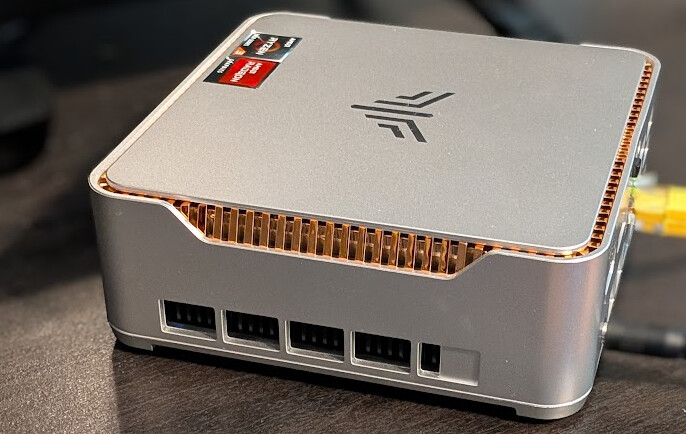
I’m running it on the new Mini-PC that got delivered yesterday. Requested information:
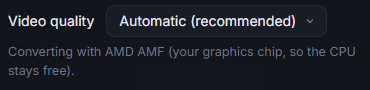
Also, from Diagnostics:

Little searching for the Ryzen 5425U shows: AMD Radeon Graphics (Radeon Vega 6)
Many thanks for the app.
So far so good but only an hour or so into use.
@Nilex Yeah it’s that darn AMD, have the same issue on my mini-PC. I develop on an Intel so didn’t notice it since it works there. Will have the CPU fix in the next release.
@Don544 It’s worth every penny, so keep that in mind
It’s in the Microsoft Store now, and the Windows installer, Mac and Linux downloads are on GitHub.
New
Improvements
Fixes
Getting it
Thanks for the reports and ideas, especially the captions one. Keep them coming!
Under More Channels does that mean it can locate another tuner? Like a separate Zinwell 600B?
Captions confirmed as fixed on AMD graphics, thanks for the speedy turnaround!
@CarbonCompound Not quite. More channels is for channels that come over the internet, like Tubi’s free channels. You give TabloView the web address of a channel list (an “M3U playlist”) and it plays those streams directly. It doesn’t search for tuners or use an antenna, and those channels can’t be recorded.
If your Zinwell can share its channels on your home network as an M3U playlist (some network tuners like HDHomeRun can), you could try pasting that playlist’s address into More channels and watch them that way, but only to watch, not record. I haven’t tested it with a second tuner, so I’d be curious to hear if it works for you.