Hi folks -
An update to the 4th Generation Tablo app for Roku is now available, featuring the new Category View for live TV and many other bug fixes and performance improvements.
You should see the update shortly, but if you’d like to get it right away, navigate to the Tablo app on your Roku device’s home screen and hit the star button (*) on your Roku remote. Then select ‘Check for Updates’.
Here’s what you can expect:
Tablo Roku App (4th Gen) Update (v. 1.3.0)
• Adds new Category View for Live TV
• Improvements to search functionality
• Fix for issues with adding or removing a channel from Favorites
• Fix for issues with Offline Mode, including live TV channel ordering
• Fix for issue where fresh channel scans appeared not to be saved
• Many other bug fixes and performance enhancements
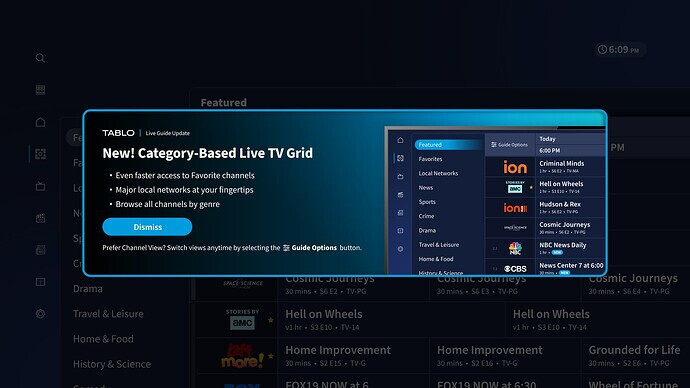
About This Release
The new Category View groups major local networks, your favorite channels, and other related programming together within the grid guide, making it even easier to browse and discover shows that match your interests.
By grouping channels with similar content instead of arbitrarily by channel number, you can quickly hop through the grid and find something great to watch, whether you want to laugh, check out the news, or learn something new.

We hope you enjoy it!
The classic Channels Grid View will still be available, and you can switch your view at any time. Your chosen view will remain your default selection until you change it, even if you close and relaunch the Tablo app.
UPDATE - Dec 2 -1:40 p.m.
A subset of users are reporting some odd behavior with the 1.3.0 update, which we believe is caused by cached data.
If you’re experiencing:
- Blank guide screen
- Inability to play back over-the-air TV channels
- Inability to change the Live TV grid view by selecting the GUIDE OPTIONS button
Please take the following steps to delete & re-add the app:
- Navigate to the Tablo app on your Roku’s home screen
- Hit the star button (*)
- From the menu select REMOVE APP
- Then from the Roku home screen select SEARCH
- Then type TABLO
- Then select the Tablo app from the search results
- Then select ADD APP
This should clear the cache and resolve any issues you’re encountering. If not, please share specific details of what you’re seeing below.
UPDATE - Dec 11 - 2:30 p.m. ET
An update to the Tablo app for Roku (version 1.3.1) is rolling out now to address some of the issues reported by users.
It includes the following:
- Fix for issue where selecting Guide Options in the Live TV Grid could cause a crash
- Fix for issue where channels in the Favorite view were not sorted by channel number
- Fix for issue where the Live TV grid could become blank when you remove all Favorited channels
- Other small bug fixes
If you have any other questions or problems with this update, post them below or touch base directly with support.