I have a Tablo 4th 2 tuner - ethernet connected - a Roku Ultra - ethernet - on my TV in the living room that works well.
I purchased 4k Roku stick and attached it to my 4k monitor in my office. The Tablo app finds the Tablo device but will not play OTA content. It sees my recorded content, but won’t play it. It tries, flashes, then goes back to the menu.
The Tablo app in my office will play the free streaming content. Other apps in my office - Netlix, etc. - work fine.
I’ve tried removing and adding the app in my office, turning roku stick off/on, no dice.
It already had the settings for the audio issue - even trieed stereo.
Audio Compatibility Mode resolves the Roku audio-compatibility issue for new recordings. Unfortunately, it can’t change how old recordings were pulled in; they’ll still have that problem.
You should see that your new OTA recordings are working without issue.
Doesn’t the monitor have to support the correct resolutions (480i thru 1080p) being transmitted. And doesn’t the client PC, roku, etc inform the monitor of the resolution it plans on sending. And some monitors have various picture mode OSD settings that affect playback - gaming, cinema, movie, etc. Don’t all of these starts have to be in alignment.
So I did a factory reset on the Roku Stick and tested it on the same LG OLED TV I have my Roku Ultra - which runs Tablo4 with no problem. I did the exact same settings on the Roku Stick that I have on my Roku Ultra (and same Tablo settings as well). The Roku Stick still won’t play OTA live streams or library streams. Maybe I have a bad Roku Stick? Though it does fine with Netflix, Prime, etc.
Did you try manually setting the roku video playback at 1080p versus automatic. And I have no idea if there is roku upscaling involved. While I don’t use a monitor I have roku ultras that go from 4200, 4210, 4660, and 4802 that don’t have problems. But I have them all running at 1080p or 720p for the really old ones which is what is currently being transmitted via ATSC 3.0 using the 4802.
That’s why I did the factory reset and tried it on my televison (instead of the monitor) with the same settings as my ULtra. I guess I could try it at a lower setting - I think I actually did try it at 1080 and 720. I’m stumped unless it is just a Roku stick issue.
Just purchased an Acer Predator 30 inch 4k with high refresh rate - but, like I noted, I’m also testing the stick on my LG Oled where I have an Ultra that works fine.
Same problem. I have 5 roku 4K sticks and they all work great with the Tablo. The new 4K Plus stick reverts back to the Tablo menu when OTA channels are selected.
I also have the new Roku streaming stick plus and same issue, OTA live bounces back to the guide
All my other Rokus work fine
Hoping this gets resolved soon
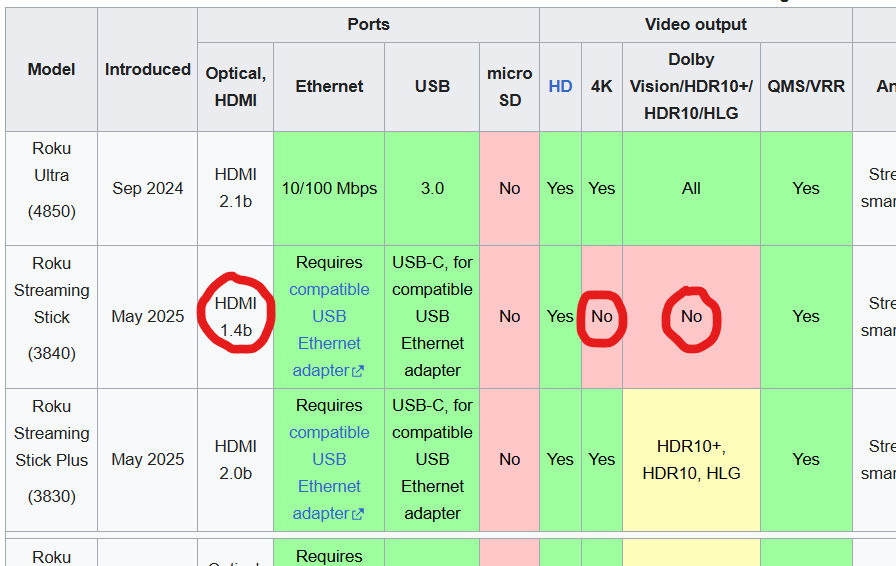
What model is your Roku Stick? This info on the wiki specs page could be concerning if you have the 3840 model. I’m no expert on video, but even the HDMI is an older version. I would use the wiki page as a quick reference guide but check the Roku page for official specs on your specific device.
*HD-only Roku streaming sticks may exhibit intermittent issues with displaying content and are generally not supported. The current Roku Streaming Stick Plus (4K) (3830) is also not supported as it does not have the video codecs required for playback of over-the-air TV. Other older low-end Roku devices and those that do not support 4K (for example, the Roku Streaming Stick 3800 and Roku Express+ 3910) are also not supported.
If you’re saving money using Tablo, you might just want to seek out the latest and call it a day. I use the Roku Ultra 4850, which has ethernet built-in, and the FireStick 4k Max, which doesn’t have ethernet built in. Both are working fine for us, but I recommend the Roku. If you don’t care about ethernet, use the Fire Stick.
The important thing about these two is they work with Wifi6 (802.11 ax), while others don’t. Many people are now using high-speed fiber and the modem and/or router is Wifi6. This would maximize your equipment (if this is what you have) and ensure against obsolescence.
You know this is crazy. I just bought one of these (3830) for an older TV. Every app works fine except for Tablo. I didn’t return it because I figured Tablo would find a fix. This is a 2025 release Roku.