Hi folks -
Tablo device owners can soon enjoy fully refactored and updated 4th Generation Tablo apps on their Samsung TIZEN and LG webOS smart TVs.
These apps have been rebuilt from the ground up to improve navigation and performance and add many features, including the new Record Live feature.
Over the coming weeks, compatible Samsung TIZEN and LG webOS smart TVs with automatic updates enabled will receive the new app.
The app will not be available immediately for all supported models.
Here’s what you can expect:
Tablo App for Samsung TIZEN and LG webOS Smart TVs (4th Gen) Update – (v. 2.0.6)
- Fully refactored Tablo app for improved navigation and performance
- Adds new screens/features including:
- Side navigation menu
- Category View for the Live TV Grid
- Offline Mode
- Record Live functionality
- Redesigned Library
- Adds details and troubleshooting help to connectivity screens
- Adds play vs. OK remote functionality to all live airings
- Adds Audio Compatibility Mode setting to default to stereo vs. surround sound
- Adds support for Closed Captioning on completed stereo sound OTA recordings saved to onboard storage
- Many other bug fixes and performance improvements

About Record Live
The new Record Live feature allows you to start recording the live TV channel you’re currently watching without returning to the guide.
Users can access the new Record Live button within the In-Player Content Tray, making it easy to start recording a live program without missing a single second.
To access the new button, simply select down ( ↓ ) on the directional pad of your Samsung or LG remote while you’re playing live TV.
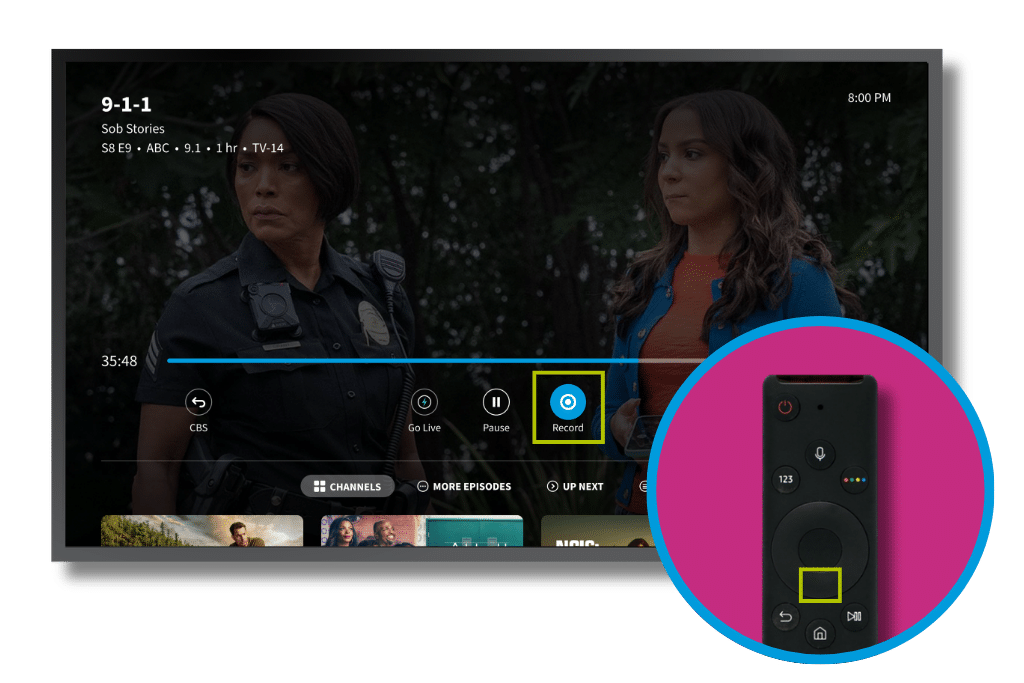
This will allow the In-Player Content Tray to appear. The RECORD button is located to the right of the PLAY/PAUSE button.
Selecting it will tell your Tablo to start a recording of the program you’re currently watching.
When the recording has begun, the button will turn orange. Selecting the button again will end the recording immediately, instead of automatically at the end of the current program.
You can read more about this new feature and how it works on the Tablo Knowledge Base.
Availability and Supported TV Models

Over the coming weeks, the Tablo app will update to the newer React Native 4th Generation app on compatible Samsung TIZEN and LG webOS smart TVs with automatic updates enabled.
The app will not be available immediately for all supported models.
-
SUPPORTED SAMSUNG MODELS
- The newer 4th Generation Tablo app will be supported on Samsung TV models manufactured in 2019 or newer running TIZEN 5.0+.
- The app will be available first on Samsung TIZEN TVs manufactured in 2024-2026.
- Older Samsung TVs, particularly those manufactured in 2021 running TIZEN 6, are experiencing approval delays. We expect the app to become available on those models soon.
-
SUPPORTED LG MODELS
- We are awaiting LG’s approval to distribute the new app to compatible models.
- The newer 4th Generation Tablo app will be supported on LG TV models manufactured in 2020 or newer running webOS 5+.
Unfortunately, LG smart TVs manufactured in 2019 running webOS 4 are not compatible with apps built using React Native. The current web-based version of the 4th Generation app will remain accessible for those users. A final update will be made available soon to include the side navigation menu and redesigned Guide and Library screens, but not all the new features mentioned above.
Don’t have the Tablo app yet? Not sure how to access apps on your smart TV?
- HOW TO: Download apps on your Samsung TIZEN smart TV
- HOW TO: Download apps on your LG webOS smart TV
For a full list of Tablo apps and compatible devices, visit tablotv.com/apps.
If you have questions or encounter problems, post them below or touch base directly with support.